Embed a live device in your web app
Your backend creates the instance with the Limrun SDK and hands the browser only that instance's URL and token. On the page, <RemoteControl /> from @limrun/ui streams it into a <div>, forwards touch and keyboard input, and exposes imperative control through a React ref.
Platform integrators use this path: products whose end users need a live mobile device on the page, such as mobile preview tools, internal QA dashboards, and cloud coding agents that work on iOS or Android.
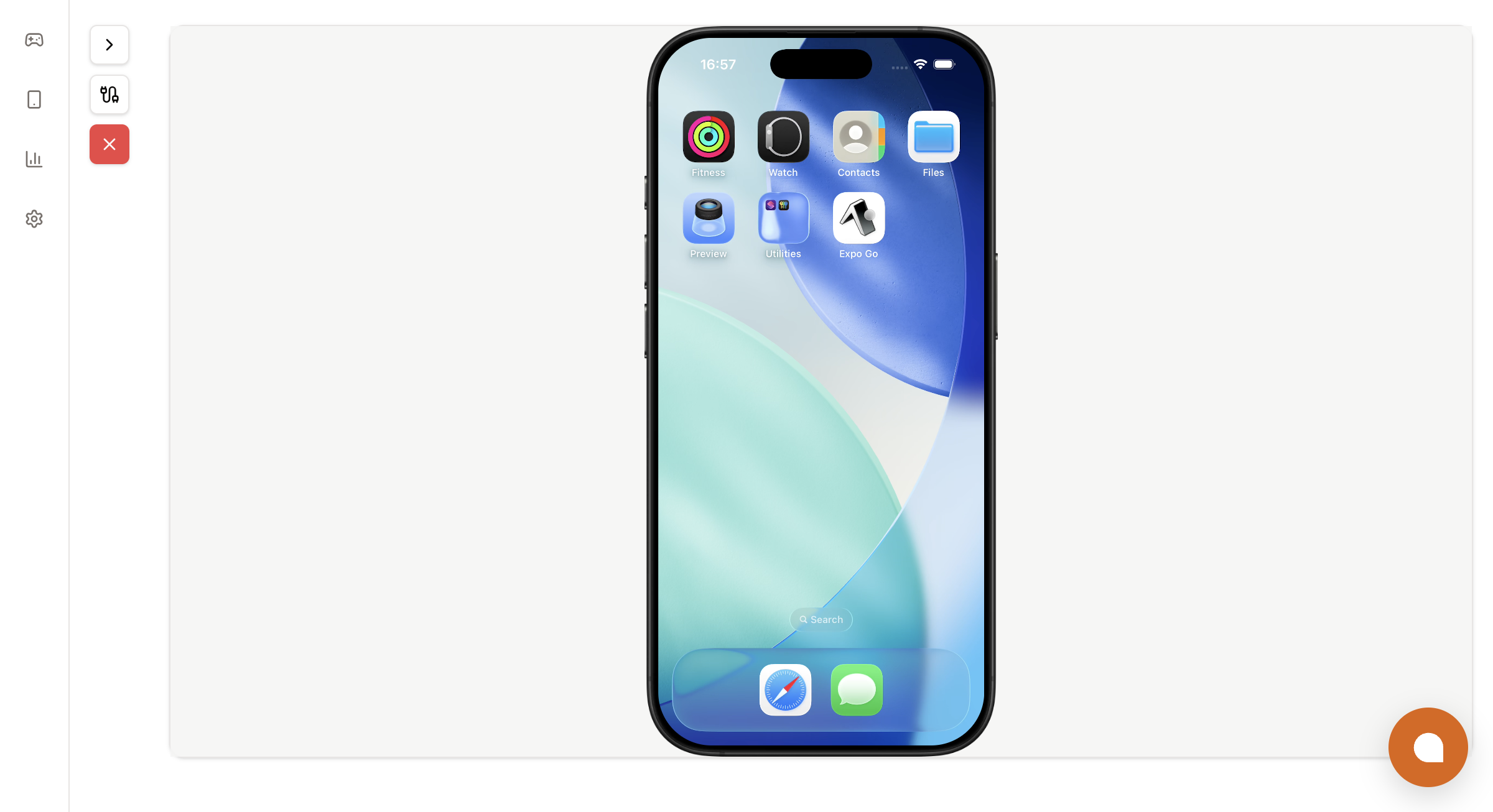
The Limrun console's Playground uses this same component for its streaming view, so what you ship to your users looks the same.
Before you start
- An API key, kept server-side. Create one at console.limrun.com under Settings → API Keys. See Authentication.
- A backend that can create instances. The single contract between your backend and
<RemoteControl />is the pairstatus.endpointWebSocketUrland a token. The examples passstatus.token.status.streamTokenopens only the streaming WebSocket, so a browser can hold it whilestatus.tokenstays on your backend. Every spec field, clue, and timeout is listed in Instance spec and status. - A React 18+ frontend, such as Vite, Next.js, Create React App, or Remix.
If your platform also builds your customers' apps, Build with Xcode covers compiling iOS apps on a remote Mac.
How the pieces fit
The browser talks to the instance directly. Your backend is the only party that holds the API key:
┌─ End user's browser ────────────┐    ┌─ Your backend ──────────────────┐
│                                 │    │                                 │
│  <RemoteControl                 │    │  POST /sessions/start ─┐        │
│    url={endpointWebSocketUrl}   │    │                        │        │
│    token={token}                │◀───┤  new Limrun({ apiKey })│        │
│  />                             │    │    .iosInstances.create(…)      │
└────────────────┬────────────────┘    └────────────────┬────────────────┘
                 │ WebSocket + WebRTC,                  │ HTTP, API key
                 │ token in query string               ▼
                 │                              Limrun control plane
                 ▼                                     │
          Limrun instance ◀─────────────────────────────┘
(status.endpointWebSocketUrl, status.token)- End user's browser. Renders
<RemoteControl />and sees only a per-instance WebSocket URL and an instance token. It never sees your API key. - Your backend. Holds the API key, creates the instance with the Limrun SDK, returns
{ endpointWebSocketUrl, token }to the browser, and handles teardown. - Limrun control plane. Provisions the instance and returns a token scoped to it.
The instance token works only while that one instance is running and grants access to nothing else. See Concepts for how API keys and instance tokens differ.
Create the instance on your backend
A minimal session endpoint creates an instance for an end user and returns the two strings the frontend needs. The same shape works in Fastify, Next.js route handlers, Go's net/http, or FastAPI; only the framework wrapper changes.
import express from 'express';
import cors from 'cors';
import Limrun from '@limrun/api';

const lim = new Limrun({ apiKey: process.env.LIM_API_KEY });

const app = express();
app.use(cors(), express.json());

app.post('/sessions/start', async (req, res) => {
  const clientIp = clientIpFrom(req);

  const instance = await lim.iosInstances.create({
    wait: true,
    reuseIfExists: true,
    metadata: {
      labels: {
        tenant: req.body.tenant,
        user:   req.body.user,
        managed_by: 'platform-embed',
      },
    },
    spec: {
      model: 'iphone',                 // 'iphone' | 'iphone-duo' | 'ipad' | 'watch'
      inactivityTimeout: '15m',
      ...(clientIp && { clues: [{ kind: 'ClientIP', clientIp }] }),
    },
  });

  res.json({
    id:        instance.metadata.id,
    endpointWebSocketUrl: instance.status.endpointWebSocketUrl,
    token:     instance.status.token,
  });
});

app.post('/sessions/stop', async (req, res) => {
  await lim.iosInstances.delete(req.body.id);
  res.sendStatus(204);
});

function clientIpFrom(req: express.Request): string | undefined {
  const xff = req.headers['x-forwarded-for'];
  const first = Array.isArray(xff) ? xff[0] : xff?.split(',')[0]?.trim();
  return first ?? req.socket.remoteAddress ?? undefined;
}

app.listen(3001);from fastapi import FastAPI, Request
from limrun_api import AsyncLimrun
import os
# The async client keeps FastAPI's event loop free while an instance boots.
lim = AsyncLimrun(api_key=os.environ["LIM_API_KEY"])
app = FastAPI()
@app.post("/sessions/start")
async def start(req: Request):
body = await req.json()
client_ip = (req.headers.get("x-forwarded-for") or req.client.host).split(",")[0].strip()
instance = await lim.ios_instances.create(
wait=True,
reuse_if_exists=True,
metadata={
"labels": {
"tenant": body.get("tenant"),
"user": body.get("user"),
"managed_by": "platform-embed",
},
},
spec={
"model": "iphone",
"inactivity_timeout": "15m",
"clues": [{"kind": "ClientIP", "client_ip": client_ip}] if client_ip else [],
},
)
return {
"id": instance.metadata.id,
"endpointWebSocketUrl": instance.status.endpoint_web_socket_url,
"token": instance.status.token,
}
@app.post("/sessions/stop")
async def stop(req: Request):
body = await req.json()
await lim.ios_instances.delete(body["id"])
return {"ok": True}package main
import (
"encoding/json"
"net"
"net/http"
"os"
"strings"
limrun "github.com/limrun-inc/go-sdk"
"github.com/limrun-inc/go-sdk/option"
"github.com/limrun-inc/go-sdk/packages/param"
)
var lim = limrun.NewClient(option.WithAPIKey(os.Getenv("LIM_API_KEY")))
type startReq struct {
Tenant string `json:"tenant"`
User string `json:"user"`
}
func startHandler(w http.ResponseWriter, r *http.Request) {
var body startReq
if err := json.NewDecoder(r.Body).Decode(&body); err != nil {
http.Error(w, err.Error(), http.StatusBadRequest)
return
}
spec := limrun.IosInstanceNewParamsSpec{InactivityTimeout: param.NewOpt("15m")}
if clientIP := clientIPFrom(r); clientIP != "" {
spec.Clues = []limrun.IosInstanceNewParamsSpecClue{{
Kind: "ClientIP",
ClientIP: param.NewOpt(clientIP),
}}
}
inst, err := lim.IosInstances.New(r.Context(), limrun.IosInstanceNewParams{
Wait: param.NewOpt(true),
ReuseIfExists: param.NewOpt(true),
Metadata: limrun.IosInstanceNewParamsMetadata{
Labels: map[string]string{
"tenant": body.Tenant,
"user": body.User,
"managed_by": "platform-embed",
},
},
Spec: spec,
})
if err != nil { http.Error(w, err.Error(), 500); return }
json.NewEncoder(w).Encode(map[string]string{
"id": inst.Metadata.ID,
"endpointWebSocketUrl": inst.Status.EndpointWebSocketURL,
"token": inst.Status.Token,
})
}
func clientIPFrom(r *http.Request) string {
if xff := r.Header.Get("X-Forwarded-For"); xff != "" {
return strings.TrimSpace(strings.Split(xff, ",")[0])
}
host, _, err := net.SplitHostPort(r.RemoteAddr)
if err != nil {
return ""
}
return host
}
func stopHandler(w http.ResponseWriter, r *http.Request) {
var body struct {
ID string `json:"id"`
}
if err := json.NewDecoder(r.Body).Decode(&body); err != nil {
http.Error(w, err.Error(), http.StatusBadRequest)
return
}
if err := lim.IosInstances.Delete(r.Context(), body.ID); err != nil {
http.Error(w, err.Error(), http.StatusInternalServerError)
return
}
w.WriteHeader(http.StatusNoContent)
}
func main() {
http.HandleFunc("/sessions/start", startHandler)
http.HandleFunc("/sessions/stop", stopHandler)
http.ListenAndServe(":3001", nil)
}Four choices in that call shape the user experience:
- Scheduling clues. Pass the end user's coordinates as a REST API
ClientLocationclue, or their IP as aClientIPclue, so the instance lands in a region near them.ClientLocationwins when both are present. See client location clues. - Labels for tenant scope and reuse. With
reuseIfExists: true, Limrun returns an existing instance whose labels match exactly, so a user who reopens their tab lands on the same warm instance. See Labels and reuse for how the lookup works. - Pre-installed app. Reference an uploaded build, or an App Store catalog entry such as Expo Go, in
spec.initialAssetsand the device opens with the app installed. See Asset Storage. - Session lifecycle.
inactivityTimeoutdefaults to your organization's setting, which may be shorter than an embedded session needs; set 10 to 30 minutes explicitly.hardTimeoutis a forced-termination cap, default'0'(no cap). Always calldeletewhen the tab closes.
Install @limrun/ui
Add the UI package to your frontend. It ships ES modules and TypeScript types, and its styles are bundled into the build:
npm  install @limrun/ui
pnpm add     @limrun/ui
bun  add     @limrun/ui
<RemoteControl /> is a single forward-refed component with no providers, no context, and no global state.
Render <RemoteControl />
Ask your backend for a session, render the component, and post a stop when the user leaves:
import { RemoteControl, type RemoteControlHandle } from '@limrun/ui';
import { useEffect, useRef, useState } from 'react';

type Session = { id: string; endpointWebSocketUrl: string; token: string };

export function Simulator() {
  const [session, setSession] = useState<Session | null>(null);
  // One signaling-session ID per mount; a new value on every render would restart the stream.
  const [tabId] = useState(() => `tab-${crypto.randomUUID()}`);
  const ctrlRef = useRef<RemoteControlHandle>(null);

  useEffect(() => {
    let cancelled = false;
    let sessionId: string | undefined;

    fetch('/sessions/start', {
      method: 'POST',
      headers: { 'Content-Type': 'application/json' },
      body: JSON.stringify({ tenant: 'acme', user: 'user_42' }),
    })
      .then((r) => r.json())
      .then((s: Session) => {
        if (cancelled) return;
        sessionId = s.id;
        setSession(s);
      });

    return () => {
      cancelled = true;
      if (sessionId) {
        fetch('/sessions/stop', {
          method: 'POST',
          headers: { 'Content-Type': 'application/json' },
          body: JSON.stringify({ id: sessionId }),
          keepalive: true,
        });
      }
    };
  }, []);

  if (!session) return <div>Booting simulator…</div>;

  return (
    <RemoteControl
      ref={ctrlRef}
      url={session.endpointWebSocketUrl}
      token={session.token}
      sessionId={tabId}
    />
  );
}
keepalive: true on the cleanup request lets it complete while the tab closes, so the instance terminates promptly instead of waiting for inactivityTimeout.
Component props
These props match @limrun/ui 0.16.0, the current latest release on npm. The iPhone Duo props ship in the 0.17.0 release candidate (npm install @limrun/ui@rc).
| Prop | Type | Default | Use |
|---|---|---|---|
url | string | required | WebSocket URL from the instance. Pass instance.status.endpointWebSocketUrl. |
token | string | required | Instance token. Pass instance.status.token. The component appends it to the connection URL as ?token=…. |
sessionId | string | random | A unique signaling-session identifier. Prevents collisions when several browser tabs resolve to the same reused instance. Create it once per mount, for example with useState and crypto.randomUUID() as in the example above; a value that changes between renders restarts the stream. |
openUrl | string | none | A URL or deep link to open on the device once the component is ready, such as https://example.com, myapp://orders/42, or exp://… for Expo Go. |
showFrame | boolean | true | Draw the device frame. See iPad and Apple Watch for models without built-in frames. |
assets | object | bundled frames | Device frame and boot-logo images. The default entry bundles Limrun's frames; the @limrun/ui/lite entry omits them so a frameless embed stays small. |
autoReconnect | boolean | false | Reconnect automatically when a working session's connection drops, instead of showing the Retry button. |
onConnectionStateChange | callback | none | Reports the coarse connection state, connecting, connected, reconnecting, failed, or terminated, for status UI outside the component. |
onTerminated | callback | none | Fires once when the component concludes the instance is gone, not just disconnected. After a drop it probes the instance over HTTP; a 404 stops reconnecting, replaces the Retry button with a terminated message, and calls this. |
className | string | none | Extra class names applied on top of the component's defaults. |
inspectMode | boolean | 'hover-only' | off | Draw accessibility boxes over the stream. true makes boxes selectable, with Tap, Copy selector, and Copy id actions, and blocks device input; 'hover-only' previews boxes under the cursor while input still passes through. |
onAxSnapshotChange | callback | none | Receives each new accessibility snapshot while inspect mode is on, for your own side panel or agent prompt. Identical snapshots are not re-sent. |
onInspectSelectionChange | callback | none | Receives the element the user clicks in inspect mode, with the snapshot at that moment, or null on deselection. |
onAxStatusChange | callback | none | Reports the accessibility subsystem status: idle, starting, ready, unavailable, or error, with an error message for the last two. Recovery is automatic. |
axPollIntervalMs | number | 500 | Base interval between accessibility-tree fetches in inspect mode. Unchanged snapshots back off; input triggers a short burst of more frequent fetches. |
axMaxBackoffMs | number | 2000 | Upper bound on the fetch interval while snapshots stay unchanged. |
androidElementTreeOptions | object | none | Android element-tree fetch options, currently waitForIdleTimeoutMs. |
onCameraDemandChange | callback | none | Reports when an app opens or closes its camera, including the browser's actual capture settings after permission or a track change. See Camera. |
onCameraStats | callback | none | About once per second while the camera is streaming, reports outbound WebRTC stats such as codec, fps, bitrate, round-trip time, and quality limitation; null once it goes idle. |
microphoneEnabled | boolean | false | Capture the user's microphone and stream it into the device's microphone. Apps that consume microphone input also start capture on their own. |
onMicrophoneStateChange | callback | none | Reports microphone capture state: whether it is active, the device label, and any error. |
deviceModel | 'iphone-duo' | auto-detected | 0.17.0 release candidate. Enable the Duo viewer explicitly; otherwise the component discovers Duo support from the connection. It does not select the model when creating an instance. |
duoModelUrl | string | built-in model | 0.17.0 release candidate. URL of a prepared custom Duo GLB. See iPhone Duo frame. |
Built-in input handling
The component translates browser events into device input without any wiring on your side:
| Browser input | Device input |
|---|---|
| Mouse click or tap | Tap |
| Mouse drag or single-finger touch drag | Swipe |
| Alt + drag | Two-finger pinch, mirrored around the screen center |
| Two-finger touch on a touchscreen | Two-finger pinch or pan |
Letters, numbers, arrows, Enter, Backspace, modifiers | Device key events |
Cmd + V / Ctrl + V | Reads the browser clipboard and pastes into the focused field on the device |
Cmd + M / Ctrl + M | Menu key |
Keyboard events forward while the embedded screen has focus; tap the screen to focus it. These gestures apply to the standard viewer. iPhone Duo supports single-finger taps and drags in both modes, but not multi-touch or mouse-wheel scrolling, and in Duo's 3D view Alt-drag rotates the view instead of pinching.
Camera
When an app opens its front or back virtual camera, <RemoteControl /> asks the browser for the matching user or environment camera and sends that track to the instance. Switching cameras in the app replaces the WebRTC track automatically, so your embed needs no camera toggle of its own.
Facing is a preference, not a requirement. A facing change restarts browser capture with an ideal constraint, so on a laptop with one camera the browser returns that camera again while the app still sees the selected virtual position and its normal front-camera mirroring. The browser and WebRTC choose the capture resolution, and the virtual-camera output follows each decoded frame's rotated dimensions, including changes after a camera switch.
Observe camera demand with the callback prop:
<RemoteControl
  url={session.endpointWebSocketUrl}
  token={session.token}
  onCameraDemandChange={(active, granted, camera) => {
    console.log({ active, granted, camera });
  }}
/>
iOS instances always report camera demand. Android instances report it when the instance supports camera injection (Android 15 and later); older Android instances stay silent. Camera capture requires HTTPS or http://localhost, as getUserMedia does. To feed a recorded video instead of a live camera, see Simulate the camera with a video.
iOS extended touch area
iOS treats the home-indicator strip as part of its gesture surface. <RemoteControl /> adds a 60-pixel touch area below the visible screen, so a drag that starts there and moves up enters the iOS gesture system the way it would on hardware: swipe up to go home, open the app switcher, or pull from the bottom. This area applies to the standard viewer; on iPhone Duo, start the gesture on the visible display.
Reconnects
<RemoteControl /> runs its own retry budget:
- During the initial connect it makes up to 3 attempts with a 1 s delay between them. If the control channel does not open within 15 s, that attempt counts as failed.
- If all 3 initial attempts fail, the component shows a Retry button and stops. Clicking it, or calling
ctrlRef.current.reconnect(), starts over. - If a working connection drops later, the component shows the Retry button with
autoReconnect={false}(the default), or reconnects in the background withautoReconnect={true}.
Use autoReconnect for long-running embedded sessions where transient network blips are expected. The Retry button is more honest for short sessions where the user benefits from knowing the connection dropped.
A keep-alive ping fires every 10 s while the page is visible and pauses while the tab is hidden, so an idle background tab does not keep the instance alive past its inactivityTimeout.
Control the device from React
Pass a ref to call methods imperatively. The handle is populated once the WebSocket and control channel are open:
| Method | Returns | Notes |
|---|---|---|
openUrl(url: string) | void | Sends a URL or deep-link message over the WebSocket. The component URL-decodes the string before sending. |
screenshot() | Promise<{ dataUri: string }> | Rejects after 30 s without a reply. In the 0.17.0 release candidate it takes an optional 'outer' | 'inner' display for iPhone Duo. |
terminateApp(bundleId: string) | Promise<void> | Rejects after 30 s without a reply. iOS only today. |
sendKeyEvent({ type, code, shiftKey?, altKey?, ctrlKey?, metaKey? }) | void | type is 'keydown' | 'keyup'; code is a DOM KeyboardEvent.code value such as 'KeyA', 'Enter', or 'ArrowDown'. |
reconnect() | void | Tears down the current WebSocket and RTC connection and starts a fresh attempt with the same url and token. |
refreshAxTree() | Promise<AxSnapshot> | Fetches the accessibility tree now, outside the normal poll cadence. |
getAxSnapshot() | AxSnapshot | null | The most recent snapshot, or null when none has arrived or inspect mode is off. |
setInspectHighlight(element) / setInspectSelection(element) | void | Drive the overlay's highlight or selection from your own UI; pass null to clear. |
getAxStatus() | AxStatus | The current accessibility status, the same value onAxStatusChange reports. |
The inspect helpers do nothing when inspect mode is off or the WebSocket is closed.
Each method in use:
const ctrlRef = useRef<RemoteControlHandle>(null);

// Open a deep link or URL on the device
ctrlRef.current?.openUrl('myapp://orders/42');

// Capture a screenshot (data URI, 30 s timeout)
const { dataUri } = await ctrlRef.current!.screenshot();

// Kill an app by bundle ID (iOS; 30 s timeout)
await ctrlRef.current!.terminateApp('com.example.MyApp');

// Send a single keyboard event
ctrlRef.current?.sendKeyEvent({ type: 'keydown', code: 'Enter' });

// Tear down the current connection and start a fresh attempt
ctrlRef.current?.reconnect();
These are browser-side controls. For richer control from your server, such as taps by accessibility selector, element trees, video recording, or app resets, drive the same instance with the device clients in Run a simulator or Run an emulator. Both paths work on one instance at the same time.
iPad and Apple Watch
showFrame ships device art for iPhone (iOS), Pixel 9 (Android phone), and Pixel Tablet (Android tablet). iPad and Apple Watch have no dedicated frame today, so render them frameless:
<RemoteControl
  url={session.endpointWebSocketUrl}
  token={session.token}
  showFrame={false}
/>
The video stream keeps the correct aspect ratio and resolution, so you can wrap the component in your own chrome. Select the model on the backend with spec.model: 'ipad' or spec.model: 'watch'.
End-to-end example
This self-contained backend and frontend pair creates an iPhone with Expo Go pre-installed and a client-IP clue, renders it, and tears it down on unmount. Drop the two files into a fresh project for a working embedded simulator:
import express, { Request, Response } from 'express';
import cors from 'cors';
import Limrun from '@limrun/api';

const lim = new Limrun({ apiKey: process.env.LIM_API_KEY! });
const app = express();
app.use(cors(), express.json());

app.post('/sessions/start', async (req: Request, res: Response) => {
  try {
    const { tenant = 'demo', user = 'anonymous' } = req.body ?? {};
    const xff = req.headers['x-forwarded-for'];
    const firstHop = Array.isArray(xff)
      ? xff[0]
      : xff?.split(',')[0]?.trim();
    const clientIp = firstHop ?? req.socket.remoteAddress ?? undefined;

    const instance = await lim.iosInstances.create({
      wait: true,
      reuseIfExists: true,
      metadata: {
        labels: { tenant, user, managed_by: 'platform-embed' },
      },
      spec: {
        model: 'iphone',
        inactivityTimeout: '15m',
        hardTimeout: '2h',
        ...(clientIp && clientIp !== '::1' && clientIp !== '127.0.0.1'
          ? { clues: [{ kind: 'ClientIP', clientIp }] }
          : {}),
        initialAssets: [
          {
            kind: 'App',
            source: 'AssetName',
            assetName: 'appstore/Expo-Go-55-iOS-latest.tar.gz',
            launchMode: 'ForegroundIfRunning',
          },
        ],
      },
    });

    res.json({
      id:        instance.metadata.id,
      endpointWebSocketUrl: instance.status.endpointWebSocketUrl,
      token:     instance.status.token,
    });
  } catch (err) {
    res.status(500).json({
      error: err instanceof Error ? err.message : String(err),
    });
  }
});

app.post('/sessions/stop', async (req: Request, res: Response) => {
  try {
    await lim.iosInstances.delete(req.body.id);
    res.sendStatus(204);
  } catch (err) {
    res.status(500).json({
      error: err instanceof Error ? err.message : String(err),
    });
  }
});

app.listen(3001, () => console.log('Backend listening on :3001'));import { RemoteControl, type RemoteControlHandle } from '@limrun/ui';
import { useEffect, useRef, useState } from 'react';
type Session = { id: string; endpointWebSocketUrl: string; token: string };
export function Simulator({ tenant, user }: { tenant: string; user: string }) {
const [session, setSession] = useState<Session | null>(null);
const [error, setError] = useState<string | null>(null);
const [tabId] = useState(() => `tab-${crypto.randomUUID()}`);
const ctrlRef = useRef<RemoteControlHandle>(null);
useEffect(() => {
let cancelled = false;
let sessionId: string | undefined;
(async () => {
try {
const res = await fetch('/sessions/start', {
method: 'POST',
headers: { 'Content-Type': 'application/json' },
body: JSON.stringify({ tenant, user }),
});
if (!res.ok) throw new Error((await res.json()).error ?? res.statusText);
const s: Session = await res.json();
if (cancelled) {
fetch('/sessions/stop', {
method: 'POST',
headers: { 'Content-Type': 'application/json' },
body: JSON.stringify({ id: s.id }),
keepalive: true,
});
return;
}
sessionId = s.id;
setSession(s);
} catch (e) {
if (!cancelled) setError(e instanceof Error ? e.message : String(e));
}
})();
return () => {
cancelled = true;
if (sessionId) {
fetch('/sessions/stop', {
method: 'POST',
headers: { 'Content-Type': 'application/json' },
body: JSON.stringify({ id: sessionId }),
keepalive: true,
});
}
};
}, [tenant, user]);
if (error) return <div role="alert">Failed to start session: {error}</div>;
if (!session) return <div>Booting simulator…</div>;
return (
<div style={{ display: 'flex', gap: 12 }}>
<RemoteControl
ref={ctrlRef}
url={session.endpointWebSocketUrl}
token={session.token}
sessionId={tabId}
autoReconnect
openUrl="exp://exp.host/@anonymous/my-snack"
/>
<button
onClick={async () => {
const shot = await ctrlRef.current?.screenshot();
if (shot) window.open(shot.dataUri);
}}
>
Screenshot
</button>
</div>
);
}A fuller version of this pattern, with a UI for switching platforms and iOS models, lives in typescript-sdk/examples/fullstack.
iPhone Duo frame
The Duo viewer ships in the @limrun/ui 0.17.0 release candidate (npm install @limrun/ui@rc). Create an iPhone Duo on your backend by setting spec.model to iphone-duo in lim.iosInstances.create. The model must be available to your organization. Return instance.status.endpointWebSocketUrl and instance.status.token to the frontend as in the provisioning example, then render the Duo with the same component:
import { RemoteControl } from '@limrun/ui';

<RemoteControl
  url={endpointWebSocketUrl}
  token={token}
  deviceModel="iphone-duo"
  showFrame
/>;
deviceModel can be omitted when the connection reports native Duo support. The 2D frame and the procedural 3D model ship with @limrun/ui, so you do not host a model file. The CLI and device API control the simulator; the UI package renders its frame.
The component defaults to a lightweight 2D view with a silver Duo frame, hinge spine, and physical buttons. Both views share the fold, hinge-angle, and rotation toolbar. Select 3D to load the folding frame on demand; switching back to 2D releases the 3D renderer while the simulator stays connected.
- 2D view. Shows the active display flat, with a brief hinge animation when you fold or unfold. The animation loads on demand and respects reduced motion; without WebGL, the view stays flat. When a screen image is available, the animation holds it briefly while it waits for a frame from the incoming display.
- 3D view. Shows the physical hinge pose, and position starts unlocked. Drag the frame or background, or Alt-drag the screen, to rotate the view. Ordinary screen gestures control iOS. Use Lock position to prevent rotation.
- Hardware buttons. In both views, the Sleep/Wake and volume buttons support clicking and holding. Hover near an edge to reveal its icons, then click either the icon or the physical button. The icons follow the device when it rotates. Camera Control is not supported yet.
Set showFrame={false} to show only the active display, without the frame, hardware buttons, viewer toolbar, or 2D/3D toggle. Touch, drag, and keyboard input stay active, and the video follows native display and orientation changes without loading a 3D renderer. Use the device client or CLI to control the hinge and orientation outside the viewer.
For a custom 3D body, pass duoModelUrl with a prepared GLB that you are licensed to serve. Limrun does not bundle a third-party model. The file must follow the Duo appearance contract. The live screens and fold controls keep working with a custom appearance. The prop replaces only the 3D body; the 2D frame and its fold animation keep the built-in appearance.
Next steps
Asset Storage
Upload customer builds and reference them in spec.initialAssets so the device opens on their app.
Instance spec and status
Every create field, clue, and status URL your backend can use.
Run a simulator
Server-side device control: selectors, element trees, recording, app resets.
Run an emulator
Android create options, the ADB tunnel, and OS-version clues.
Was this guide helpful?