Asset Storage
Asset Storage is Limrun's managed store for app binaries. A boot install means the device starts with the app ready, and a live install swaps in a new build without restarting the session. Build commands upload to it, preview links read from it, and platforms use it to hold their users' apps.
What an asset is
An asset is one stored file. Installable files are iOS simulator builds (.app, .app.zip, or .app.tar.gz) and Android APKs (.apk). Build uploads can also store signed device artifacts, such as an IPA from Sign and distribute or an AAB from Sign and publish, and lim ios keychain save stores encrypted keychain archives. Its record has this shape:
interface Asset {
  id:                string;
  name:              string;
  kind:              'App' | 'Keychain';               // defaults to App
  displayName?:      string;
  md5?:              string;                           // present only once bytes are uploaded
  platform?:         'ios' | 'android' | 'xcode';      // unset = usable on any platform
  expiresAt?:        string;                           // when set, the time the asset is deleted automatically
  signedDownloadUrl?: string;                          // returned when includeDownloadUrl=true
  signedUploadUrl?:   string;                          // returned when includeUploadUrl=true
}| Field | Meaning |
|---|---|
id | Stable, auto-generated identifier. |
name | Your identifier. Names are unique across your organization; to separate tenants, use prefixes. |
kind | App (default) for installable binaries, Keychain for keychain archives, such as those created by lim ios keychain save. |
displayName | Optional human-readable label shown in the console; falls back to name. |
md5 | Set once the bytes are uploaded. getOrUpload compares it to skip duplicate uploads, and installApp uses it for server-side caching. |
platform | Limits which platform can install the asset. Useful when one logical name, such as acme/my-app-v1.2.3, covers both an iOS simulator build and an Android APK. Responses also include os, a deprecated alias with the same value. |
expiresAt | When set, the time after which the asset, bytes and record, is deleted. See Set an expiry. |
signedDownloadUrl / signedUploadUrl | Time-limited URLs. Returned when you ask for them on list or get, and always on getOrCreate. |
Upload an asset
Pick the upload path by who holds the file:
getOrUpload(CLIlim asset push) when your code or CI has the file locally. It skips the upload when the bytes are already stored.getOrCreatewhen something else does the upload, such as a worker on another host, a streaming source, or an end user's browser.
Upload a local file
getOrUpload computes the local file's MD5, checks Asset Storage for an entry with the same name and MD5, and skips the transfer when they match. It ships in the TypeScript and Go SDKs; from Python, use the two-step upload.
Upload a local build under a name of your choice:
lim asset push ./build/MyApp.app.tar.gz -n my-app-v1.2.3.tar.gzimport Limrun from '@limrun/api';
const lim = new Limrun({ apiKey: process.env['LIM_API_KEY'] });
const asset = await lim.assets.getOrUpload({
path: './build/MyApp.app.tar.gz',
name: 'my-app-v1.2.3.tar.gz', // optional, defaults to the file's basename
});
// asset.id, asset.name, asset.signedDownloadUrl, asset.md5asset, err := lim.Assets.GetOrUpload(ctx, limrun.AssetGetOrUploadParams{
Path: "./build/MyApp.app.tar.gz",
Name: param.NewOpt("my-app-v1.2.3.tar.gz"), // optional
})
// asset.ID, asset.Name, asset.SignedDownloadURL, asset.Md5When the MD5 matches an existing upload, the call returns the existing asset's URLs and transfers no bytes.
Limrun's iOS preview GitHub Action gives each pull request its own asset slot with a naming convention like this one, so the slot can be deleted when the PR closes:
# Naming convention: preview/<owner>/<repo>/pr-<number>-<platform>
lim asset push ./build/MyApp.app.tar.gz \
  -n "preview/${OWNER}/${REPO}/pr-${PR_NUMBER}-ios"
The action itself builds and uploads in one step through the TypeScript SDK, using the same naming convention. lim xcode build --upload "preview/…" also builds and uploads in one step; see Build with Xcode.
Upload from another process or a browser
getOrCreate (GetOrNew in Go, get_or_create in Python) returns the asset record with a signedUploadUrl; you PUT the bytes to it yourself:
const asset = await lim.assets.getOrCreate({ name: 'my-app-v1.2.3.tar.gz' });
// asset.id, asset.name, asset.signedUploadUrl, asset.signedDownloadUrl,
// asset.md5 (if an upload already exists)

if (!asset.md5) {
  const data = await fs.promises.readFile('./build/MyApp.app.tar.gz');
  await fetch(asset.signedUploadUrl, {
    method: 'PUT',
    body: data,
    headers: {
      'Content-Length': data.length.toString(),
      'Content-Type':   'application/octet-stream',
    },
  });
}
import hashlib
import requests
from limrun_api import Limrun
client = Limrun() # picks up LIM_API_KEY from env
path = "./build/MyApp.app.tar.gz"
name = "my-app-v1.2.3.tar.gz"
with open(path, "rb") as f:
data = f.read()
local_md5 = hashlib.md5(data).hexdigest()
asset = client.assets.get_or_create(name=name)
if asset.md5 != local_md5:
r = requests.put(
asset.signed_upload_url,
data=data,
headers={"Content-Type": "application/octet-stream"},
)
r.raise_for_status()
# asset.id, asset.name, asset.signed_download_urlasset, err := lim.Assets.GetOrNew(ctx, limrun.AssetGetOrNewParams{
Name: "my-app-v1.2.3.tar.gz",
})
// asset.SignedUploadURL, asset.SignedDownloadURL, asset.Md5 (if exists)
if err != nil {
return err
}
if asset.Md5 == "" {
data, err := os.ReadFile("./build/MyApp.app.tar.gz")
if err != nil {
return err
}
req, err := http.NewRequest("PUT", asset.SignedUploadURL, bytes.NewReader(data))
if err != nil {
return err
}
req.Header.Set("Content-Type", "application/octet-stream")
req.ContentLength = int64(len(data))
resp, err := http.DefaultClient.Do(req)
if err != nil {
return err
}
defer resp.Body.Close()
}For browser-direct uploads, call getOrCreate on your backend, where the API key lives, and hand only the signedUploadUrl to the browser. The browser PUTs to it without touching your LIM_API_KEY or proxying bytes through your servers, which fits platforms whose end users upload their own builds.
Set an expiry
Every upload path accepts an optional time-to-live as a Go duration string: --ttl on lim asset push, ttl on getOrUpload and getOrCreate in the TypeScript SDK, --upload-ttl on lim xcode build and lim gradle build, and --asset-ttl on create --install and install-app. The asset, bytes and record, is deleted that long after the upload. The minimum is 1m; 1d is not valid Go syntax, so write 24h.
lim asset push ./build/MyApp.app.tar.gz -n my-app-v1.2.3.tar.gz --ttl 720hThe default depends on how the asset was uploaded:
- Direct uploads (
lim asset push,getOrUpload,getOrCreate) never expire unless you pass a TTL. Re-uploading under the same name keeps the recorded expiry; pass a TTL on the re-upload to change it. - Build uploads (
lim xcode build --upload,lim gradle build --upload, and Bazel uploads) default to 14 days. Each build upload without an explicit--upload-ttlmoves the expiry to 14 days from that upload, so actively rebuilt assets stay alive and abandoned ones get swept.
Install an asset
There are two moments to install: at instance boot, or into an instance that is already running. Both accept an Asset Storage entry (by name or ID) or a publicly reachable HTTPS URL, such as a GitHub release asset or an S3 presigned URL. URLs on your LAN do not work, because the instance downloads the file.
Pre-install at boot
Add entries to spec.initialAssets in the create call, and the device starts with the app on its home screen. On the CLI, --install <path> uploads a local file to Asset Storage first, and --install-asset <name> references a stored asset; repeat either flag for several apps.
Create a simulator with the app installed. The SDK examples show every source:
lim ios create --install ./MyApp.app.tar.gzconst instance = await lim.iosInstances.create({
wait: true,
spec: {
initialAssets: [
// From Asset Storage by name
{ kind: 'App', source: 'AssetName', assetName: 'my-app-v1.2.3.tar.gz',
launchMode: 'ForegroundIfRunning' },
// From a public HTTPS URL
{ kind: 'App', source: 'URL', url: 'https://example.com/builds/123.tar.gz' },
// By asset ID (when you already have one)
{ kind: 'App', source: 'AssetID', assetId: 'asset_01j...' },
],
},
});instance = client.ios_instances.create(
wait=True,
spec={
"initial_assets": [
# From Asset Storage by name
{"kind": "App", "source": "AssetName", "asset_name": "my-app-v1.2.3.tar.gz",
"launch_mode": "ForegroundIfRunning"},
# From a public HTTPS URL
{"kind": "App", "source": "URL", "url": "https://example.com/builds/123.tar.gz"},
# By asset ID (when you already have one)
{"kind": "App", "source": "AssetID", "asset_id": "asset_01j..."},
],
},
)instance, err := lim.IosInstances.New(ctx, limrun.IosInstanceNewParams{
Wait: param.NewOpt(true),
Spec: limrun.IosInstanceNewParamsSpec{
InitialAssets: []limrun.IosInstanceNewParamsSpecInitialAsset{
// From Asset Storage by name
{
Kind: "App",
Source: "AssetName",
AssetName: param.NewOpt("my-app-v1.2.3.tar.gz"),
LaunchMode: "ForegroundIfRunning",
},
// From a public HTTPS URL
{
Kind: "App",
Source: "URL",
URL: param.NewOpt("https://example.com/builds/123.tar.gz"),
},
// By asset ID (when you already have one)
{
Kind: "App",
Source: "AssetID",
AssetID: param.NewOpt("asset_01j..."),
},
},
},
})An iOS initialAssets entry has these fields:
| Field | Type | Meaning |
|---|---|---|
kind | 'App' | 'Keychain' | App installs an app. Keychain restores an encrypted keychain snapshot and requires encryptionKey; see Save and restore the keychain. There is no 'Configuration' variant on iOS. |
source | 'URL' | 'AssetName' | 'AssetID' | How to resolve the asset. |
url / assetName / assetId | string | The matching identifier. |
launchMode | 'ForegroundIfRunning' | 'RelaunchIfRunning' | ForegroundIfRunning brings the app to the foreground, launching it if needed; RelaunchIfRunning kills and relaunches it. Omit it to install without launching. |
The Python SDK takes the same fields in snake_case (initial_assets, asset_name, launch_mode), and the Go SDK as IosInstanceNewParamsSpecInitialAsset values. Both accept only kind: 'App'.
Create an emulator with the app installed. The SDK examples show one entry per source:
lim android create --install-asset my-app-v1.2.3.apkconst instance = await lim.androidInstances.create({
wait: true,
spec: {
initialAssets: [
// From Asset Storage by name
{ kind: 'App', source: 'AssetName', assetName: 'my-app-v1.2.3.apk' },
// From a public HTTPS URL
{ kind: 'App', source: 'URL', url: 'https://example.com/builds/123.apk' },
// By asset ID (Android takes a list)
{ kind: 'App', source: 'AssetIDs', assetIds: ['asset_01j...'] },
],
},
});instance = client.android_instances.create(
wait=True,
spec={
"initial_assets": [
# From Asset Storage by name
{"kind": "App", "source": "AssetName", "asset_name": "my-app-v1.2.3.apk"},
# From a public HTTPS URL
{"kind": "App", "source": "URL", "url": "https://example.com/builds/123.apk"},
# By asset ID (Android takes a list)
{"kind": "App", "source": "AssetIDs", "asset_ids": ["asset_01j..."]},
],
},
)instance, err := lim.AndroidInstances.New(ctx, limrun.AndroidInstanceNewParams{
Wait: param.NewOpt(true),
Spec: limrun.AndroidInstanceNewParamsSpec{
InitialAssets: []limrun.AndroidInstanceNewParamsSpecInitialAsset{
// From Asset Storage by name
{
Kind: "App",
Source: "AssetName",
AssetName: param.NewOpt("my-app-v1.2.3.apk"),
},
// From a public HTTPS URL
{
Kind: "App",
Source: "URL",
URL: param.NewOpt("https://example.com/builds/123.apk"),
},
// By asset ID (Android takes a list)
{
Kind: "App",
Source: "AssetIDs",
AssetIDs: []string{"asset_01j..."},
},
},
},
})An Android initialAssets entry has these fields:
| Field | Type | Meaning |
|---|---|---|
kind | 'App' | 'Configuration' | App installs an APK; Configuration carries an instance-level setting. |
source | 'URL' | 'URLs' | 'AssetName' | 'AssetNames' | 'AssetIDs' | URL and AssetName install one APK. The plural variants take a list and install it as one split-APK group, base APK first, config splits after. There is no singular asset-ID source on Android. |
url / assetName | string | Singular identifier. |
urls / assetNames / assetIds | string[] | Split-APK group. The first entry is the base APK; the rest are density, locale, or ABI splits. |
configuration | object | Used when kind: 'Configuration'. |
Android initialAssets has no launchMode field: each app installed at boot is launched right after installation, so the instance is ready to use on first connect.
An app that ships as a base APK plus config.*.apk splits must install as one atomic group, with a plural source; the server installs it with pm install-multiple. The CLI cannot group files, so use an SDK. Pre-install APKs has the split-APK examples in every language.
kind: 'Configuration' entries are settings, not stored files: the only one today is ChromeFlag, which Playwright needs. A configuration entry has no MD5, no signed URLs, and no assets.list representation, and the CLI has no flag for it. See Set Chrome flags.
For the rest of the create call, such as regions, clues, timeouts, and sandboxes, see Instance spec and status. It also shows a full create response.
Install on a running instance
When a user rebuilds during a live session, push the new build and tell the running instance to install it. No restart and no reconnect are needed:
lim ios install-app ./MyApp.app.tar.gz
lim android install-app https://example.com/build.apk --id <instance-id>
// The device clients use installApp on iOS and sendAsset on Android.
// iOS: the md5 enables server-side caching, so a build already installed
// in this region skips the download.
await ios.installApp(asset.signedDownloadUrl, {
md5: asset.md5,
launchMode: 'ForegroundIfRunning',
});
// Android: the instance downloads the APK and runs pm install.
// The default client-side timeout is 120 s; raise it for large APKs.
await android.sendAsset(asset.signedDownloadUrl, 180_000);CLI only: install-app accepts a local path, which it uploads to Asset Storage first with MD5 deduplication, or a URL it passes to the instance.
installApp accepts md5, timeoutMs (default 120_000), and launchMode. The Go iOS client has InstallApp too; sendAsset is TypeScript-only, and the Python SDK has no device client. From those languages, use lim ios install-app and lim android install-app, or adb install over the tunnel. Split-APK groups install only at boot. For opening device clients and the full app lifecycle, see Manage apps and Pre-install APKs.
Use Expo Go and other catalog apps
Limrun maintains a small catalog of prebuilt apps under the appstore/ name prefix. It holds Expo Go, which lets React Native users open a Snack or a local Expo project on a remote device without uploading anything, and the Maestro XCTest runner used by the Maestro integration.
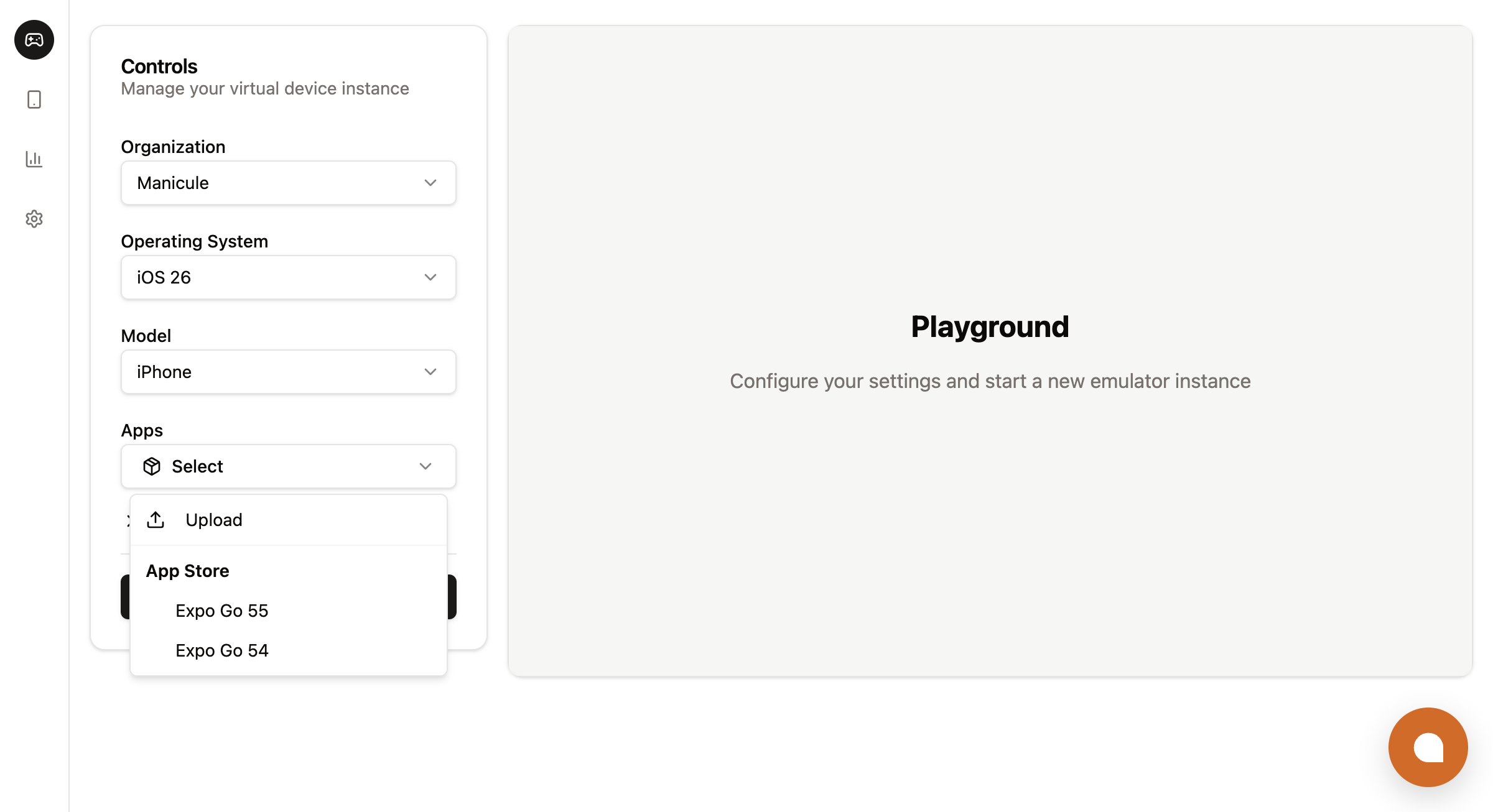
| Asset name | OS | What it is |
|---|---|---|
appstore/Expo-Go-54.0.6.tar.gz | iOS | Expo Go 54.0.6 (iOS Simulator build) |
appstore/Expo-Go-55-iOS-latest.tar.gz | iOS | Expo Go 55, latest (iOS Simulator build) |
appstore/Expo-Go-54.0.6.apk | Android | Expo Go 54.0.6 (APK) |
appstore/Expo-Go-55-latest.apk | Android | Expo Go 55, latest (APK) |
appstore/maestro-ios-runner-2.5.1.tar.gz | iOS | Maestro XCTest runner for Maestro flows |
Install a catalog app at boot the same way as your own assets. The appstore/ prefix is part of the name:
spec: {
  initialAssets: [{
    kind: 'App',
    source: 'AssetName',
    assetName: 'appstore/Expo-Go-55-iOS-latest.tar.gz',   // or .apk for Android
    launchMode: 'ForegroundIfRunning',
  }],
}
Pair the boot install with the openUrl prop of <RemoteControl /> to land the device on the user's Expo project on first paint:
<RemoteControl
  url={session.endpointWebSocketUrl}
  token={session.token}
  openUrl="exp://exp.host/@user/my-snack"
/>
That is the whole integration: the backend creates the instance with the Expo Go asset, and the frontend renders <RemoteControl /> with the project URL. No Expo Go upload and no build pipeline.
List the catalog to see what else is available. The server fills the result with your own assets first and gives catalog entries only the remaining slots, so filter on the appstore/ prefix to see the whole catalog:
lim asset list --include-app-store --name-prefix appstore/const apps = await lim.assets.list({
includeAppStore: true,
namePrefixFilter: 'appstore/',
});The API strips the appstore/ prefix before it queries the catalog. nameFilter: 'appstore/Expo-Go-54.0.6.tar.gz' with includeAppStore: true works as expected, but a partial prefix such as namePrefixFilter: 'appstor' never matches a catalog entry, because the comparison happens after the prefix is removed.
Organize assets for multiple tenants
Asset names are global to your organization. The store has no tenant scoping, no labels, and no folders; the one primitive is the name itself, queried with namePrefixFilter in the TypeScript SDK or --name-prefix on the CLI.
Put the tenant, or any stable scope such as a workspace, customer, project, repository, or PR number, at the front of the name:
acme/my-app-v1.2.3.tar.gz
acme/my-app-2026-05-18-abc1234.tar.gz
acme/my-app-pr-742.apk
globex/expo-snack-build.tar.gz
The slash is not required, but it reads well and survives any prefix scan. Pick one separator and use it across your platform.
Two common operations follow from the prefix:
// List one tenant's assets (for an admin UI or a usage dashboard)
const acmeAssets = await lim.assets.list({
  namePrefixFilter:   'acme/',
  includeDownloadUrl: true,
});

// Offboarding: drop everything a tenant ever uploaded. assets.list returns one
// batch of at most `limit` items and does not page, so repeat until it is empty.
let batch;
while ((batch = await lim.assets.list({ namePrefixFilter: 'acme/', limit: 500 })).length) {
  for (const a of batch) await lim.assets.delete(a.id);
}
The platform field splits a tenant's namespace further when one logical name covers both an iOS simulator build and an Android APK:
const list = await lim.assets.list({ namePrefixFilter: 'acme/' });
const iosOnly     = list.filter((a) => a.platform === 'ios');
const androidOnly = list.filter((a) => a.platform === 'android');
const universal   = list.filter((a) => !a.platform);
Integrations written before the field was named platform may still read os, which is returned as a deprecated alias with the same value.
List, get, and delete assets
assets.list, assets.get, and assets.delete are the calls you wire into an admin UI, a cleanup job, or an offboarding flow. List assets with a name filter, fetch one by ID, and delete it:
lim asset list
lim asset list --name my-app-v1.2.3.tar.gz --download-url
lim asset list <id> --download-url
lim asset delete <id>
const assets = await lim.assets.list({
limit: 50,
nameFilter: 'my-app-v1.2.3.tar.gz', // exact match
// namePrefixFilter: 'acme/', // alternative; LIKE wildcards treated as literals
includeDownloadUrl: true,
includeUploadUrl: false,
includeAppStore: false,
});
const single = await lim.assets.get(assetId, { includeDownloadUrl: true });
await lim.assets.delete(assetId);from limrun_api import Limrun
client = Limrun()
assets = client.assets.list(
limit=50,
name_filter="my-app-v1.2.3.tar.gz",
include_download_url=True,
)
single = client.assets.get(asset_id, include_download_url=True)
client.assets.delete(asset_id)assets, err := lim.Assets.List(ctx, limrun.AssetListParams{
Limit: param.NewOpt(int64(50)),
NameFilter: param.NewOpt("my-app-v1.2.3.tar.gz"),
IncludeDownloadURL: param.NewOpt(true),
})
single, err := lim.Assets.Get(ctx, assetID, limrun.AssetGetParams{
IncludeDownloadURL: param.NewOpt(true),
})
err = lim.Assets.Delete(ctx, assetID)assets.list accepts these filters:
| Filter | Behavior |
|---|---|
nameFilter | Case-sensitive exact match on name. Cannot be combined with namePrefixFilter. |
namePrefixFilter | TypeScript SDK, CLI (--name-prefix), and REST only. Case-sensitive prefix match. LIKE wildcards (%, _) are treated as literal characters. An empty string is rejected with 400, so omit the parameter when you do not want filtering. Cannot be combined with nameFilter. |
includeDownloadUrl / includeUploadUrl | Set to true to include signed URLs on each returned asset. Default false, for a smaller response. |
includeAppStore | Include catalog assets, returned with the appstore/ name prefix. |
limit | Maximum number of items returned. Default 50. assets.list returns a single batch and does not page. |
The CLI maps these to --name, --name-prefix, --download-url, --upload-url, and --include-app-store, and adds --kind App|Keychain to filter by kind. For example, list one tenant's assets:
lim asset list --name-prefix acme/To download an asset's file, use lim asset pull <id_or_name>.
Next steps
Embed a device
Render <RemoteControl /> on an instance that boots straight into the customer's app.
Build with Xcode
lim xcode build --upload lands an iOS simulator build in Asset Storage.
PR previews
Upload a build on every pull request and post a preview link.
SDKs and REST API
Asset calls and parameters across TypeScript, Python, and Go.
Was this guide helpful?