# Embed the simulator
URL: /docs/platform/embed-simulator
LLM index: /llms.txt
Description: Render a live iOS, iPadOS, watchOS, or Android device inside your web app with `` from `@limrun/ui`. Your backend keeps the API key; the browser only sees a per-instance URL and token.
# Embed the simulator
`` from [`@limrun/ui`](https://www.npmjs.com/package/@limrun/ui) streams a Limrun instance into a `
` in your web app. It opens a WebSocket + WebRTC connection to the instance, paints the screen, forwards touch and keyboard input, and exposes imperative control through a React ref.
This is the path platform integrators take: companies whose end users need a live mobile device on the page. Cloud coding agents that work on iOS, iPadOS, watchOS, or Android. Mobile preview tools. Internal QA dashboards. Same component, same wiring, on every one of those.
The Limrun console's Playground uses this exact component for its own streaming view, so what you ship to your users looks the same.
## Architecture overview for platforms
```
┌─ End user's browser ────────────┐ ┌─ Your backend ──────────────────┐
│ │ │ │
│ │ │ .iosInstances.create(…) │
└────────────────┬────────────────┘ └────────────────┬────────────────┘
│ WebSocket + WebRTC, │ HTTP, API key
│ token in query string ▼
│ Limrun control plane
▼ │
Limrun instance ◀─────────────────────────────┘
(status.endpointWebSocketUrl, status.token)
```
Three parts of the system:
- **End user's browser.** Renders ``, sees only a per-instance WebSocket URL and a per-instance token. Never sees your API key.
- **Your backend.** Holds your API key, creates the instance via the Limrun SDK, returns `{ webrtcUrl, token }` to the browser, and handles teardown.
- **Limrun control plane.** Provisions the instance and returns a token scoped to it.
### Authentication
The client browser never sees your API key, it uses a WebSocket URL and a token scoped to just the **one** instance. This token works only as long as that instance is running, and can't be used to access anything else.
## Prerequisites
Before you embed, you need:
- **A Limrun API key, kept server-side.** Sign up at [console.limrun.com](https://console.limrun.com), open **Settings → API Keys**, and create a token. See [Authentication](/docs/reference#authentication) for the full flow.
- **A way to create an instance from your backend.** Follow [Run an iOS simulator](/docs/ios/run-simulator) (covers iPhone, iPad, Apple Watch) or [Run an Android emulator](/docs/android/run-emulator).
- **A React 18+ frontend.** Vite, Next.js, Create React App, Remix, etc.
The single contract between your backend and `` is the pair `endpointWebSocketUrl + token` from `instance.status`. Every spec field, region clue, label pattern, and lifecycle knob lives on the per-platform pages above.
If your platform also builds your customers' apps in the cloud (not just runs them), [Build with remote Xcode](/docs/ios/build-with-xcode) is the companion page for compiling iOS apps on a remote Mac.
## Backend provisioning
A minimal session endpoint creates an instance for an end user and returns the two strings the frontend needs. The same shape works in Fastify, Next.js route handlers, Go's `net/http`, or Python's FastAPI; only the framework wrapper changes.
```ts title="backend/index.ts"
import express from 'express';
import cors from 'cors';
import Limrun from '@limrun/api';
const lim = new Limrun({ apiKey: process.env.LIM_API_KEY });
const app = express();
app.use(cors(), express.json());
app.post('/sessions/start', async (req, res) => {
const clientIp = clientIpFrom(req);
const instance = await lim.iosInstances.create({
wait: true,
reuseIfExists: true,
metadata: {
labels: {
tenant: req.body.tenant,
user: req.body.user,
managed_by: 'platform-embed',
},
},
spec: {
model: 'iphone', // 'iphone' | 'ipad' | 'watch'
inactivityTimeout: '15m',
...(clientIp && { clues: [{ kind: 'ClientIP', clientIp }] }),
},
});
res.json({
id: instance.metadata.id,
webrtcUrl: instance.status.endpointWebSocketUrl,
token: instance.status.token,
});
});
app.post('/sessions/stop', async (req, res) => {
await lim.iosInstances.delete(req.body.id);
res.sendStatus(204);
});
function clientIpFrom(req: express.Request): string | undefined {
const xff = req.headers['x-forwarded-for'];
const first = Array.isArray(xff) ? xff[0] : xff?.split(',')[0]?.trim();
return first ?? req.socket.remoteAddress ?? undefined;
}
app.listen(3001);
```
```go title="backend/main.go"
package main
import (
"encoding/json"
"net/http"
"os"
"strings"
limrun "github.com/limrun-inc/go-sdk"
"github.com/limrun-inc/go-sdk/option"
"github.com/limrun-inc/go-sdk/packages/param"
)
var lim = limrun.NewClient(option.WithAPIKey(os.Getenv("LIM_API_KEY")))
type startReq struct {
Tenant string `json:"tenant"`
User string `json:"user"`
}
func startHandler(w http.ResponseWriter, r *http.Request) {
var body startReq
json.NewDecoder(r.Body).Decode(&body)
clientIP := clientIPFrom(r)
inst, err := lim.IosInstances.New(r.Context(), limrun.IosInstanceNewParams{
Wait: param.NewOpt(true),
ReuseIfExists: param.NewOpt(true),
Metadata: limrun.IosInstanceNewParamsMetadata{
Labels: map[string]string{
"tenant": body.Tenant,
"user": body.User,
"managed_by": "platform-embed",
},
},
Spec: limrun.IosInstanceNewParamsSpec{
InactivityTimeout: param.NewOpt("15m"),
Clues: []limrun.IosInstanceNewParamsSpecClue{{
Kind: "ClientIP",
ClientIP: param.NewOpt(clientIP),
}},
},
})
if err != nil { http.Error(w, err.Error(), 500); return }
json.NewEncoder(w).Encode(map[string]string{
"id": inst.Metadata.ID,
"webrtcUrl": inst.Status.EndpointWebSocketURL,
"token": inst.Status.Token,
})
}
func clientIPFrom(r *http.Request) string {
if xff := r.Header.Get("X-Forwarded-For"); xff != "" {
return strings.TrimSpace(strings.Split(xff, ",")[0])
}
host, _, _ := strings.Cut(r.RemoteAddr, ":")
return host
}
func main() {
http.HandleFunc("/sessions/start", startHandler)
http.ListenAndServe(":3001", nil)
}
```
```python title="backend/main.py"
from fastapi import FastAPI, Request
from limrun_api import Limrun
import os
lim = Limrun(api_key=os.environ["LIM_API_KEY"])
app = FastAPI()
@app.post("/sessions/start")
async def start(req: Request):
body = await req.json()
client_ip = (req.headers.get("x-forwarded-for") or req.client.host).split(",")[0].strip()
instance = lim.ios_instances.create(
wait=True,
reuse_if_exists=True,
metadata={
"labels": {
"tenant": body.get("tenant"),
"user": body.get("user"),
"managed_by": "platform-embed",
},
},
spec={
"model": "iphone",
"inactivity_timeout": "15m",
"clues": [{"kind": "ClientIP", "client_ip": client_ip}] if client_ip else [],
},
)
return {
"id": instance.metadata.id,
"webrtcUrl": instance.status.endpoint_web_socket_url,
"token": instance.status.token,
}
@app.post("/sessions/stop")
async def stop(req: Request):
body = await req.json()
lim.ios_instances.delete(body["id"])
return {"ok": True}
```
A few details worth calling out. Full coverage of each lives on [Run an iOS simulator](/docs/ios/run-simulator#configure-the-instance) and [Run an Android emulator](/docs/android/run-emulator#configure-the-instance).
- **Scheduling clues.** Network latency between client browser and Limrun's hosting region can be minised by hinting Limrun's scheduler to provision the instance closer to the end user's location. To do this, forward the end user's IP (`X-Forwarded-For` or `req.socket.remoteAddress`) as a `ClientIP` clue so the instance lands near them.
- **Labels for tenant scope and reuse.** Labels are free-form key-value pairs which can be used to organise multiple tenants or reuse hot instances. If `reuseIfExists` is set to `true`, scheduler returns existing hot instance whose `region` and `labels` match the current create call, so a user reopening their tab lands back on the same warm instance.
- **Pre-install the customer's app.** Reference an uploaded build (or an [App Store catalog entry like Expo Go](/docs/platform/asset-storage#working-with-expo-go)) via `spec.initialAssets`, and the embedded simulator is launched with the app pre-installed during provisioning. See [Asset Storage](/docs/platform/asset-storage).
- **Session lifecycle.** `inactivityTimeout` defaults to `3m`, almost always too short for an embedded UI; set 10 to 30 minutes. `hardTimeout` is a forced-termination safety cap, default `'0'` (no cap). Always wire up an explicit `delete` on tab close.
## Install `@limrun/ui`
Add the UI package to your frontend. It ships ES modules and TypeScript types; styles are bundled into the build.
```bash
# Pick your package manager
npm install @limrun/ui
pnpm add @limrun/ui
bun add @limrun/ui
```
Works in any React 18+ tree (Vite, Next.js, Create React App, Remix). `` is a single forward-refed component with no providers, no context, and no global state.
## Render ``
Ask your backend for a session, render the component, post a stop when the user leaves.
```tsx title="frontend/Simulator.tsx"
import { RemoteControl, type RemoteControlHandle } from '@limrun/ui';
import { useEffect, useRef, useState } from 'react';
type Session = { id: string; webrtcUrl: string; token: string };
export function Simulator() {
const [session, setSession] = useState(null);
const ctrlRef = useRef(null);
useEffect(() => {
let cancelled = false;
let sessionId: string | undefined;
fetch('/sessions/start', { method: 'POST' })
.then((r) => r.json())
.then((s: Session) => {
if (cancelled) return;
sessionId = s.id;
setSession(s);
});
return () => {
cancelled = true;
if (sessionId) {
fetch('/sessions/stop', {
method: 'POST',
headers: { 'Content-Type': 'application/json' },
body: JSON.stringify({ id: sessionId }),
keepalive: true,
});
}
};
}, []);
if (!session) return
Booting simulator…
;
return (
);
}
```
`keepalive: true` on the cleanup fetch lets the request complete even if the tab is closing, so the instance terminates promptly instead of waiting for `inactivityTimeout`.
## Component props
| Prop | Type | Default | Use |
|---|---|---|---|
| `url` | string | required | WebSocket URL from the instance. Pass `instance.status.endpointWebSocketUrl`. |
| `token` | string | required | Per-instance bearer. Pass `instance.status.token`. The component appends it to the connection URL as `?token=…`. |
| `sessionId` | string | random | A unique signaling-session identifier. Prevents collisions when multiple browser tabs resolve to the same reusable instance. Use a fresh value per tab (e.g. `tab-${Date.now()}`). |
| `openUrl` | string | none | A URL or deep link to open on the device once the control channel opens (e.g. `https://example.com`, `myapp://orders/42`, `exp://…` for Expo Go). |
| `showFrame` | boolean | `true` | Draw the device bezel around the video. See [iPad and Apple Watch](#ipad-and-apple-watch); only iPhone and Pixel models ship native bezel art. |
| `autoReconnect` | boolean | `false` | If a working session's connection drops, reconnect automatically instead of showing the Retry button. |
| `className` | string | none | Extra class names applied on top of the component's defaults. |
## Pre-wired interactions
The component translates browser events into device input on its own. No wiring required from your side.
| Browser input | Device input |
|---|---|
| Mouse click / tap | Tap |
| Mouse drag / single-finger touch drag | Swipe |
| Alt + drag | Two-finger pinch (mirrored around the screen center) |
| Two-finger touch on a touchscreen | Two-finger pinch / pan |
| Letters, numbers, arrows, `Enter`, `Backspace`, modifiers | Forwarded as device key events |
| `Cmd + V` / `Ctrl + V` | Reads browser clipboard, pastes into the focused field on the device |
| `Cmd + M` / `Ctrl + M` | Sends the Menu key |
Keyboard events only forward while the embedded `
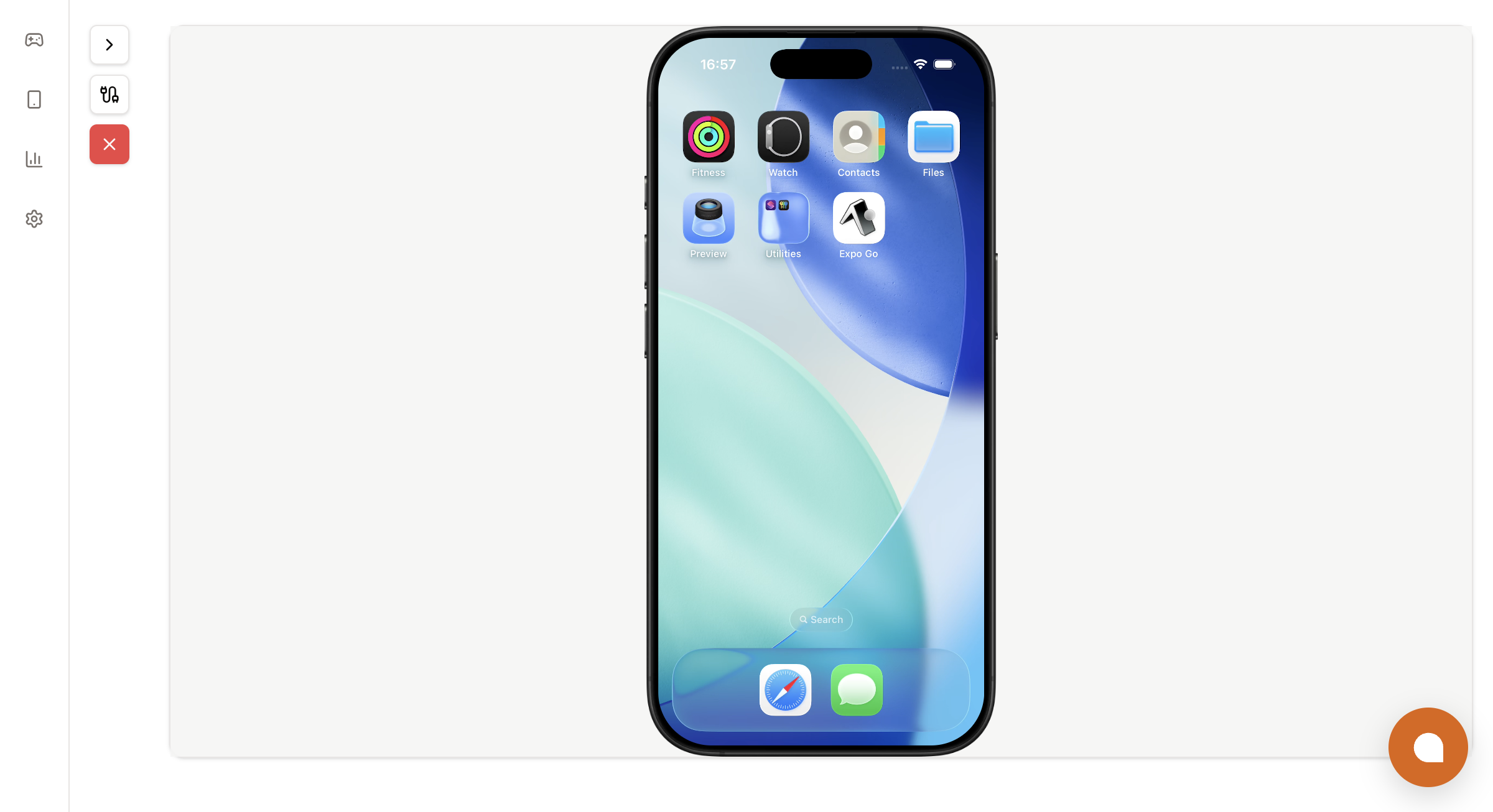 The Limrun console's Playground uses this exact component for its own streaming view, so what you ship to your users looks the same.
## Architecture overview for platforms
```
┌─ End user's browser ────────────┐ ┌─ Your backend ──────────────────┐
│ │ │ │
│
The Limrun console's Playground uses this exact component for its own streaming view, so what you ship to your users looks the same.
## Architecture overview for platforms
```
┌─ End user's browser ────────────┐ ┌─ Your backend ──────────────────┐
│ │ │ │
│