# Asset Storage
URL: /docs/platform/asset-storage
LLM index: /llms.txt
Description: Limrun's managed binary store. Pre-install your customers' apps at instance boot and hot-deploy new builds into running embedded sessions
# Asset Storage
Asset Storage is the binary store that backs every Limrun instance. It lets you:
1. **Pre-install an app build** (Android, iOS, iPadOS or watchOS) at boot so the embedded simulator starts with the app ready.
2. **Hot-deploy a fresh build** into a *running* embedded session on rebuilds.
For how to connect platform users to those instances, see [Embed the simulator](/docs/platform/embed-simulator).
## What are Assets?
An asset is a single installable binary, such as an iOS simulator build (`.app`, `.app.zip`, or `.app.tar.gz`) or an Android APK (`.apk`).
```ts
interface Asset {
id: string;
name: string;
displayName?: string;
md5?: string; // present only once bytes are uploaded
os?: 'ios' | 'android'; // unset = usable on either platform
signedDownloadUrl?: string; // returned when includeDownloadUrl=true
signedUploadUrl?: string; // returned when includeUploadUrl=true
}
```
| Field | Meaning |
|---|---|
| `id` | Stable auto-generated identifier. |
| `name` | Customizable identifier. Names need to be unique globally in your org. To organise for multi-tenancy, [use prefixes](#asset-organisation-for-multi-tenancy). |
| `displayName` | Optional human-readable label surfaced in the console; falls back to `name`. |
| `md5` | Set once the bytes have been uploaded. Unique hash used by `getOrUpload` to skip re-uploads for duplicates and by `installApp` to enable server-side caching. |
| `os` | Limits which platform can install the asset. Useful when the same logical name (e.g. `acme/my-app-v1.2.3`) covers both an iOS sim build and an Android APK. |
| `signedDownloadUrl` / `signedUploadUrl` | Time-limited URLs. Only returned when you ask for them on `list`/`get`, or always on `getOrCreate`. |
### Configuration entries on `initialAssets`
Stored assets are always binaries. That's the only thing the `Asset` record models, and there's no `kind` field on it. But `spec.initialAssets` accepts a second flavour of entry, `kind: 'Configuration'`, which carries an instance-level setting instead of pointing at Asset Storage. The `kind` field lives on the [`initialAsset` shape](#pre-install-on-boot), not on the `Asset` record.
The only configuration today is `ChromeFlag`, used to enable Chrome's command-line on non-rooted Android emulators so [Playwright](/docs/testing/playwright) can attach. **SDK-only**: `@limrun/cli` doesn't expose a `--chrome-flag` flag, so this entry has to come from the SDK directly.
```ts
spec: {
initialAssets: [
{
kind: 'Configuration',
configuration: {
kind: 'ChromeFlag',
chromeFlag: 'enable-command-line-on-non-rooted-devices@1',
},
},
],
}
```
```go
limrun.AndroidInstanceNewParamsSpecInitialAsset{
Kind: "Configuration",
Configuration: limrun.AndroidInstanceNewParamsSpecInitialAssetConfiguration{
Kind: "ChromeFlag",
ChromeFlag: "enable-command-line-on-non-rooted-devices@1",
},
}
```
```python
{
"kind": "Configuration",
"configuration": {
"kind": "ChromeFlag",
"chrome_flag": "enable-command-line-on-non-rooted-devices@1",
},
}
```
A `kind: 'Configuration'` entry has no MD5, no signed URLs, and no `assets.list` representation. It exists only on the instance spec. The rest of this page is about `kind: 'App'` entries, which are the ones actually backed by Asset Storage.
## Upload an asset
Two paths:
- Use `getOrUpload` for CI pipelines and hot-reloading of apps to instances.
- Use `getOrCreate` when you need a `signedUploadUrl` for an untrusted client browser to do the upload.
### getOrUpload
`getOrUpload` computes the local file's MD5 hash, checks Asset Storage for an existing entry with the same name + same MD5, and skips re-upload if it matches.
This helper ships in **TypeScript and Go SDKs**. Python users have to do the two steps manually with `getOrCreate` (shown in the next subsection).
```bash
lim asset push ./build/MyApp.app.tar.gz -n my-app-v1.2.3.tar.gz
```
```ts
import Limrun from '@limrun/api';
const lim = new Limrun({ apiKey: process.env['LIM_API_KEY'] });
const asset = await lim.assets.getOrUpload({
path: './build/MyApp.app.tar.gz',
name: 'my-app-v1.2.3.tar.gz', // optional, defaults to the file's basename
});
// asset.id, asset.name, asset.signedDownloadUrl, asset.md5
```
```go
asset, err := lim.Assets.GetOrUpload(ctx, limrun.AssetGetOrUploadParams{
Path: "./build/MyApp.app.tar.gz",
Name: param.NewOpt("my-app-v1.2.3.tar.gz"), // optional
})
// asset.ID, asset.Name, asset.SignedDownloadURL, asset.MD5
```
If the file's MD5 already matches an existing upload, `getOrUpload` returns immediately with the existing asset's URLs and no bytes are transferred.
For example, Limrun's [automatic PR preview GitHub Action](https://github.com/limrun-inc/ios-preview-action) uses it like this:
```bash
# Each PR in each repo gets its own asset slot, deletable on PR close.
# Naming convention: preview///pr--
lim asset push ./build/MyApp.app.tar.gz \
-n "preview/${OWNER}/${REPO}/pr-${PR_NUMBER}-ios"
```
(The action itself rolls the build and upload into a single `lim xcode build --upload "preview/…"` step (see [Build with remote Xcode](/docs/ios/build-with-xcode)), but the naming convention is the same.)
### getOrCreate
When you need finer control, for example for uploading from a worker, from a different host, from a streaming source, or letting the **end user's browser** PUT directly to the storage URL, use the lower-level `getOrCreate` and PUT to the returned `signedUploadUrl` yourself.
```ts
const asset = await lim.assets.getOrCreate({ name: 'my-app-v1.2.3.tar.gz' });
// asset.id, asset.name, asset.signedUploadUrl, asset.signedDownloadUrl,
// asset.md5 (if an upload already exists)
if (!asset.md5) {
const data = await fs.promises.readFile('./build/MyApp.app.tar.gz');
await fetch(asset.signedUploadUrl, {
method: 'PUT',
body: data,
headers: {
'Content-Length': data.length.toString(),
'Content-Type': 'application/octet-stream',
},
});
}
```
```go
asset, err := lim.Assets.GetOrCreate(ctx, limrun.AssetGetOrCreateParams{
Name: "my-app-v1.2.3.tar.gz",
})
// asset.SignedUploadURL, asset.SignedDownloadURL, asset.MD5 (if exists)
if asset.MD5 == "" {
data, _ := os.ReadFile("./build/MyApp.app.tar.gz")
req, _ := http.NewRequest("PUT", asset.SignedUploadURL, bytes.NewReader(data))
req.Header.Set("Content-Type", "application/octet-stream")
req.ContentLength = int64(len(data))
_, err := http.DefaultClient.Do(req)
}
```
```python
import hashlib
import requests
from limrun_api import Limrun
client = Limrun() # picks up LIM_API_KEY from env
path = "./build/MyApp.app.tar.gz"
name = "my-app-v1.2.3.tar.gz"
with open(path, "rb") as f:
data = f.read()
local_md5 = hashlib.md5(data).hexdigest()
asset = client.assets.get_or_create(name=name)
if asset.md5 != local_md5:
r = requests.put(
asset.signed_upload_url,
data=data,
headers={"Content-Type": "application/octet-stream"},
)
r.raise_for_status()
# asset.id, asset.name, asset.signed_download_url
```
For **browser-direct uploads**, generate the `signedUploadUrl` on your backend (where the API key lives) and hand only the URL to the browser. The browser PUTs to it without ever touching your `LIM_API_KEY` or proxying bytes through your servers. Useful when end users on your platform upload their own builds.
## Install an asset
Two install paths:
- Pre-install at instance boot.
- Push into an already-running instance.
### Pre-install on boot
Reference your asset as an entry on the `spec.initialAssets` array during the provisioning call. This will start the simulator with **the app already on the home screen**.
Each entry must resolve to a binary the pod can fetch: either an existing Asset Storage entry (by name or ID), or a publicly reachable HTTPS URL such as a GitHub release asset, an S3 presigned URL, or anything else the cloud can reach. URLs on your LAN won't work.
```bash
# Local file: uploaded to Asset Storage on the fly, then installed at boot.
lim ios create --install ./MyApp.app.tar.gz
# Already in Asset Storage? Reference by name.
lim ios create --install-asset my-app-v1.2.3.tar.gz
# Repeat the flags for multiple separate apps.
lim ios create --install-asset a.tar.gz --install-asset b.tar.gz
```
```ts
const instance = await lim.iosInstances.create({
wait: true,
spec: {
initialAssets: [
// From Asset Storage by name
{ kind: 'App', source: 'AssetName', assetName: 'my-app-v1.2.3.tar.gz',
launchMode: 'ForegroundIfRunning' },
// From a public HTTPS URL
{ kind: 'App', source: 'URL', url: 'https://example.com/builds/123.tar.gz' },
// By asset ID (when you already have one)
{ kind: 'App', source: 'AssetID', assetId: 'asset_01j...' },
],
},
});
/**
* launchMode controls behaviour after the install completes:
* - 'ForegroundIfRunning': bring to foreground if already running, otherwise launch
* - 'RelaunchIfRunning': kill and relaunch if already running
* - undefined: don't launch after installation
*/
```
```go
inst, _ := lim.IosInstances.New(ctx, limrun.IosInstanceNewParams{
Wait: param.NewOpt(true),
Spec: limrun.IosInstanceNewParamsSpec{
InitialAssets: []limrun.IosInstanceNewParamsSpecInitialAsset{
{
Kind: "App",
Source: "AssetName",
AssetName: param.NewOpt("my-app-v1.2.3.tar.gz"),
LaunchMode: "ForegroundIfRunning",
},
{
Kind: "App",
Source: "URL",
URL: param.NewOpt("https://example.com/builds/123.tar.gz"),
},
{
Kind: "App",
Source: "AssetID",
AssetID: param.NewOpt("asset_01j..."),
},
},
},
})
```
```python
instance = lim.ios_instances.create(
wait=True,
spec={
"initial_assets": [
{
"kind": "App",
"source": "AssetName",
"asset_name": "my-app-v1.2.3.tar.gz",
"launch_mode": "ForegroundIfRunning",
},
{
"kind": "App",
"source": "URL",
"url": "https://example.com/builds/123.tar.gz",
},
{
"kind": "App",
"source": "AssetID",
"asset_id": "asset_01j...",
},
],
},
)
```
`IosInstanceCreateParams.Spec.InitialAsset` shape:
| Field | Type | Meaning |
|---|---|---|
| `kind` | `'App'` | iOS only supports App assets at boot. There is **no `'Configuration'` variant** on iOS. |
| `source` | `'URL' \| 'AssetName' \| 'AssetID'` | How to resolve the asset. |
| `url` / `assetName` / `assetId` | string | The matching identifier. |
| `launchMode` | `'ForegroundIfRunning' \| 'RelaunchIfRunning'` | Launch behavior post-install. Omit to install without launching. |
```bash
# Local APK uploaded to Asset Storage on the fly, then installed.
lim android create --install ./build.apk
# Multiple unrelated apps; each --install becomes its own install group.
lim android create --install ./app-a.apk --install ./app-b.apk
# Already in Asset Storage? Reference it by name instead.
lim android create --install-asset my-app-v1.2.3.apk
```
```ts
// Single APK
const instance = await lim.androidInstances.create({
wait: true,
spec: {
initialAssets: [
{ kind: 'App', source: 'AssetName', assetName: 'my-app-v1.2.3.apk' },
// From a public HTTPS URL
{ kind: 'App', source: 'URL', url: 'https://example.com/builds/123.apk' },
// By asset ID
{ kind: 'App', source: 'AssetID', assetId: 'asset_01j...' },
],
},
});
// Multiple separate apps: one initialAsset entry per app.
const multipleApps = await lim.androidInstances.create({
wait: true,
spec: {
initialAssets: [
{ kind: 'App', source: 'AssetName', assetName: 'feature-a.apk' },
{ kind: 'App', source: 'AssetName', assetName: 'feature-b.apk' },
],
},
});
```
```go
inst, _ := lim.AndroidInstances.New(ctx, limrun.AndroidInstanceNewParams{
Wait: param.NewOpt(true),
Spec: limrun.AndroidInstanceNewParamsSpec{
InitialAssets: []limrun.AndroidInstanceNewParamsSpecInitialAsset{
{
Kind: "App",
Source: "AssetName",
AssetName: param.NewOpt("my-app-v1.2.3.apk"),
},
{
Kind: "App",
Source: "URL",
URL: param.NewOpt("https://example.com/builds/123.apk"),
},
{
Kind: "App",
Source: "AssetID",
AssetID: param.NewOpt("asset_01j..."),
},
},
},
})
```
```python
instance = lim.android_instances.create(
wait=True,
spec={
"initial_assets": [
{"kind": "App", "source": "AssetName", "asset_name": "my-app-v1.2.3.apk"},
{"kind": "App", "source": "URL", "url": "https://example.com/builds/123.apk"},
{"kind": "App", "source": "AssetID", "asset_id": "asset_01j..."},
],
},
)
```
Android's `initialAsset` has no `launchMode` field. Boot installs only. To launch an APK after the instance is ready, drive a launch from your control code (e.g. via ADB through [`startAdbTunnel`](/docs/android/run-emulator#adb-tunnel-the-main-door-in)).
If your app ships as a base APK plus density / locale / ABI splits (`base.apk` + `config.*.apk`), the whole set must install as one atomic group. See [Split APKs](#split-apks) for the grouped-install shape, which applies to both pre-install on boot and mid-session install.
`AndroidInstanceCreateParams.Spec.InitialAsset` shape:
| Field | Type | Meaning |
|---|---|---|
| `kind` | `'App' \| 'Configuration'` | App = APK install; Configuration = instance-level config value (Android-only; see [Configuration entries on `initialAssets`](#configuration-entries-on-initialassets)). |
| `source` | `'URL' \| 'URLs' \| 'AssetName' \| 'AssetNames' \| 'AssetIDs'` | Singular variants install one APK. Plural variants (`URLs`, `AssetNames`, `AssetIDs`) install a **split-APK group** atomically: base APK first, config splits after. |
| `url` / `assetName` / `assetId` | string | Singular identifier. |
| `urls` / `assetNames` / `assetIds` | string[] | Split-APK group. The first entry is the base APK; the rest are density/locale/ABI splits. |
| `configuration` | object | Used when `kind: 'Configuration'`. |
For the rest of the create-call spec (regions, clues, timeouts, sandboxes), see [Run an iOS simulator](/docs/ios/run-simulator#configure-the-instance) and [Run an Android emulator](/docs/android/run-emulator#configure-the-instance).
### Install on a running instance
When the user rebuilds while the embedded session is live, push the new asset and tell the running instance to install it. No restart, no reconnect.
The URL handed to the daemon has the same reachability rule as `initialAssets`: it must be a publicly reachable HTTPS URL (GitHub release asset, S3 presigned URL) or come from [Asset Storage](#upload-an-asset). The CLI's `install-app` accepts either a local path (uploaded to Asset Storage first, MD5-deduplicated) or a URL.
```bash
# Local path: uploaded to Asset Storage first, then installed.
lim ios install-app ./MyApp.app.tar.gz
# Remote URL: passed straight to the daemon.
lim ios install-app https://example.com/build.tar.gz
lim ios install-app https://... --md5 --launch-mode ForegroundIfRunning
```
```ts
// installApp accepts any URL the simulator can reach (signedDownloadUrl works).
// The md5 argument enables server-side caching: if the same bytes were
// installed on this region before, the install becomes near-instant.
await ios.installApp(asset.signedDownloadUrl, {
md5: asset.md5,
launchMode: 'ForegroundIfRunning',
});
```
```go
_, err := iosClient.InstallApp(ctx, asset.SignedDownloadURL, &iosws.AppInstallationOptions{
MD5: asset.MD5,
LaunchMode: "ForegroundIfRunning",
})
```
Python doesn't ship a WebSocket instance client. Run `lim ios install-app` from a subprocess, or call the WebSocket protocol directly.
`installApp` accepts an `AppInstallationOptions` object:
| Field | Type | Meaning |
|---|---|---|
| `md5` | string | MD5 hex digest. Enables server-side install caching for remote URLs. |
| `timeoutMs` | number | Client-side install timeout. Default `120_000` (120 s). |
| `launchMode` | `'ForegroundIfRunning' \| 'RelaunchIfRunning'` | Launch behavior after install. Omit to install without launching. |
```bash
# Local path: uploaded to Asset Storage first (MD5-deduplicated), then installed.
lim android install-app ./build.apk
# Remote URL: passed straight to the daemon.
lim android install-app https://example.com/build.apk --id
```
```ts
// Local file: upload once, then install via the returned signed URL.
const asset = await lim.assets.getOrUpload({ path: './build.apk' });
await android.sendAsset(asset.signedDownloadUrl);
// Or install straight from a public URL.
await android.sendAsset('https://example.com/build.apk');
// Default request timeout is 120 s. Pass a custom timeout for larger APKs.
await android.sendAsset(asset.signedDownloadUrl, 180_000);
```
`sendAsset` is TypeScript-only today. From Go or Python, drive the install via `lim android install-app` (or push the APK through the ADB tunnel; see [ADB tunnel](/docs/android/run-emulator#adb-tunnel-the-main-door-in)).
`sendAsset(url, timeoutMs?)` triggers a server-side download + `pm install`. The default client-side timeout is **120 s**; pass a higher value if your APK is large enough that the install can run past two minutes.
### Split APKs
If you ship your Android app as **split APKs** (a `base.apk` plus a few `config.*` APKs), the whole set must install as one atomic group or the app won't run.
Pass them together in one `initialAsset` (boot) or `sendAsset` (mid-session) call by giving the entry an array via the plural source variants (`AssetNames`, `URLs`, `AssetIDs`). The first filename is treated as the base APK; the rest are config splits. The server installs them via `pm install-multiple`.
```ts
// Pre-install at boot
await lim.androidInstances.create({
wait: true,
spec: {
initialAssets: [
// From Asset Storage by name
{ kind: 'App', source: 'AssetNames',
assetNames: ['base.apk', 'config.xxhdpi.apk', 'config.en.apk'] },
// Or from public HTTPS URLs the daemon can reach
{ kind: 'App', source: 'URLs',
urls: [
'https://example.com/base.apk',
'https://example.com/config.xxhdpi.apk',
'https://example.com/config.en.apk',
] },
],
},
});
```
```go
inst, _ := lim.AndroidInstances.New(ctx, limrun.AndroidInstanceNewParams{
Wait: param.NewOpt(true),
Spec: limrun.AndroidInstanceNewParamsSpec{
InitialAssets: []limrun.AndroidInstanceNewParamsSpecInitialAsset{
{
Kind: "App",
Source: "AssetNames",
AssetNames: []string{"base.apk", "config.xxhdpi.apk", "config.en.apk"},
},
{
Kind: "App",
Source: "URLs",
URLs: []string{
"https://example.com/base.apk",
"https://example.com/config.xxhdpi.apk",
"https://example.com/config.en.apk",
},
},
},
},
})
```
```python
lim.android_instances.create(
wait=True,
spec={
"initial_assets": [
{"kind": "App", "source": "AssetNames",
"asset_names": ["base.apk", "config.xxhdpi.apk", "config.en.apk"]},
{"kind": "App", "source": "URLs",
"urls": [
"https://example.com/base.apk",
"https://example.com/config.xxhdpi.apk",
"https://example.com/config.en.apk",
]},
],
},
)
```
**Split APKs are SDK-only.**
Use separate entries in `initialAssets` when you want to install unrelated apps in sequence; everything inside one entry is treated as a single grouped install.
### Example response
A successful `create` returns the full instance resource. The fields you'll typically reach for from the embed and install paths:
```json
{
"metadata": {
"id": "android_usw1_01krxvphn8e3rbeq0zewgw209a",
"createdAt": "2026-05-19T19:52:42Z",
"organizationId": "org_01kr52j...",
"labels": { "tenant": "acme", "user": "user_42" }
},
"spec": {
"inactivityTimeout": "10m0s",
"region": "us-west"
},
"status": {
"state": "ready",
"apiUrl": "https://us-west-1.limrun.net/v1/android_usw1_.../api",
"adbWebSocketUrl": "wss://.../adbWebSocket",
"endpointWebSocketUrl": "wss://.../endpointWebSocket",
"signedStreamUrl": "https://console.limrun.com/signedStream?token=lim_...&url=…",
"mcpUrl": "https://.../mcp",
"targetHttpPortUrlPrefix": "wss://.../targetHttpPort",
"token": "lim_..."
}
}
```
`state` cycles through `'unknown' \| 'creating' \| 'assigned' \| 'ready' \| 'terminated'`. `spec.inactivityTimeout` is returned as a Go duration string (`"10m0s"`, not the `"10m"` you pass in).
The iOS shape is identical with these differences:
- **iOS-only:** `status.sandbox.xcode.url` when `spec.sandbox.xcode.enabled` is set.
- **Android-only:** `status.adbWebSocketUrl` (WebSocket endpoint for ADB tunnel), `status.sandbox.playwrightAndroid.url` when the Playwright sub-sandbox is enabled.
For the full field reference, see [Status URL surface](/docs/reference#status-url-surface).
## Working with Expo Go
Limrun maintains a small curated catalog of pre-built apps under the `appstore/` name prefix. Currently, only Expo Go is available, which lets React Native users on your platform open a Snack or a local Expo project on a remote device without uploading anything.
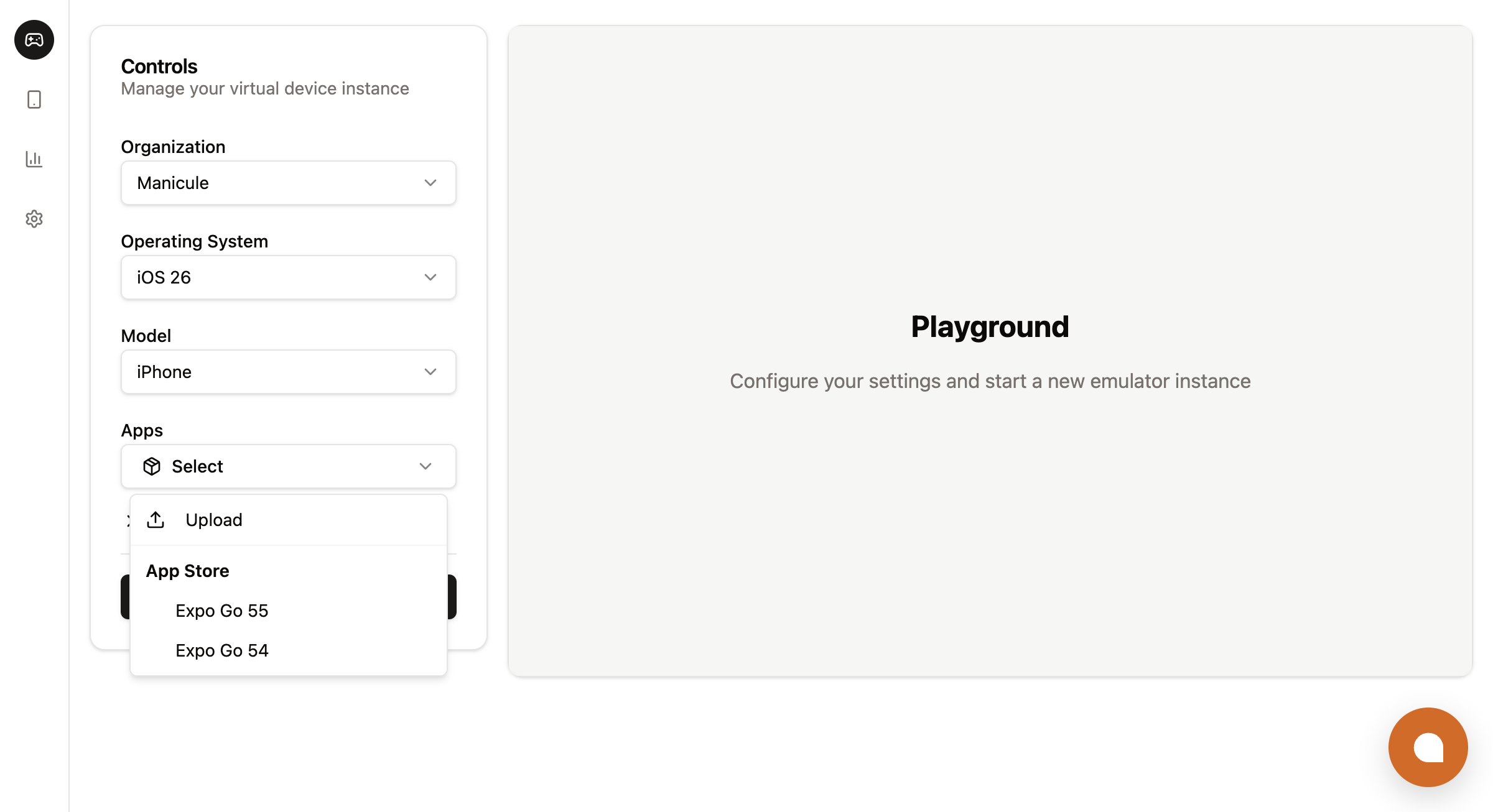 App Store asset reference:
| Asset name | OS | What it is |
|---|---|---|
| `appstore/Expo-Go-54.0.6.tar.gz` | iOS | Expo Go 54.0.6 (iOS Simulator build) |
| `appstore/Expo-Go-55-iOS-latest.tar.gz` | iOS | Expo Go 55, latest (iOS Simulator build) |
| `appstore/Expo-Go-54.0.6.apk` | Android | Expo Go 54.0.6 (APK) |
| `appstore/Expo-Go-55-latest.apk` | Android | Expo Go 55, latest (APK) |
Install at boot the same way as one of your own assets. The `appstore/` prefix is just part of the name:
```ts
spec: {
initialAssets: [{
kind: 'App',
source: 'AssetName',
assetName: 'appstore/Expo-Go-55-iOS-latest.tar.gz', // or .apk for Android
launchMode: 'ForegroundIfRunning',
}],
}
```
Pair the boot install with the [``](/docs/platform/embed-simulator#component-props) prop to land the device on the user's Expo project automatically on first paint:
```tsx
```
That's the full integration: backend creates the instance with the Expo Go asset, frontend renders `` with the project URL. No Expo Go upload, no build pipeline, no app-store dance.
List the available App Store entries to discover what else is curated:
```bash
lim asset list --include-app-store
```
```ts
const apps = await lim.assets.list({
includeAppStore: true,
namePrefixFilter: 'appstore/',
});
```
The `appstore/` prefix is part of the stored name on the client side, but the API strips it before querying the App Store catalog server-side. That means `nameFilter: 'appstore/Expo-Go-54.0.6.tar.gz'` works as expected when combined with `includeAppStore: true`, but a partial prefix like `nameFilter: 'appstor'` will never match anything in the App Store, since the comparison happens after the prefix is removed.
## Asset organisation for multi-tenancy
Asset names are **global to your org**, not per-tenant. The store has no built-in tenant scoping, no labels, no folders. The single primitive you have is the name itself, plus `namePrefixFilter` to query it.
### Use prefixes to divide namespaces
The convention is to put the tenant (or workspace, customer, project, GitHub org/repo, PR number, anything stable) at the front of the name as a prefix:
```text
acme/my-app-v1.2.3.tar.gz
acme/my-app-2026-05-18-abc1234.tar.gz
acme/my-app-pr-742.apk
globex/expo-snack-build.tar.gz
```
The slash isn't required, but it reads well and survives any prefix scan. Pick a separator and stick to it across your platform.
Two patterns fall out of this naturally:
```ts
// List one tenant's assets (for an admin UI or a usage dashboard)
const acmeAssets = await lim.assets.list({
namePrefixFilter: 'acme/',
includeDownloadUrl: true,
});
// Offboarding: drop everything a tenant ever uploaded
const stale = await lim.assets.list({ namePrefixFilter: 'acme/' });
for (const a of stale) {
await lim.assets.delete(a.id);
}
```
The `os` field on each `Asset` lets you further split a tenant's namespace by platform when the same logical name covers both an iOS sim build and an Android APK:
```ts
const list = await lim.assets.list({ namePrefixFilter: 'acme/' });
const iosOnly = list.filter((a) => a.os === 'ios');
const androidOnly = list.filter((a) => a.os === 'android');
const universal = list.filter((a) => !a.os);
```
### Filtering options
`assets.list`, `assets.get`, and `assets.delete` are the operations you'll wire into your admin UI, your reaper, and your offboarding flow.
```bash
lim asset list
lim asset list --name my-app-v1.2.3.tar.gz --download-url
lim asset list --download-url
lim asset delete
```
```ts
const assets = await lim.assets.list({
limit: 50,
nameFilter: 'my-app-v1.2.3.tar.gz', // exact match
// namePrefixFilter: 'acme/', // alternative; LIKE wildcards treated as literals
includeDownloadUrl: true,
includeUploadUrl: false,
includeAppStore: false,
});
const single = await lim.assets.get(assetId, { includeDownloadUrl: true });
await lim.assets.delete(assetId);
```
```go
assets, err := lim.Assets.List(ctx, limrun.AssetListParams{
Limit: param.NewOpt(int64(50)),
NameFilter: param.NewOpt("my-app-v1.2.3.tar.gz"),
IncludeDownloadURL: param.NewOpt(true),
})
single, err := lim.Assets.Get(ctx, assetID, limrun.AssetGetParams{
IncludeDownloadURL: param.NewOpt(true),
})
err = lim.Assets.Delete(ctx, assetID)
```
```python
from limrun_api import Limrun
client = Limrun()
assets = client.assets.list(
limit=50,
name_filter="my-app-v1.2.3.tar.gz",
include_download_url=True,
)
single = client.assets.get(asset_id, include_download_url=True)
client.assets.delete(asset_id)
```
Full set of filters on `assets.list`:
| Filter | Behavior |
|---|---|
| `nameFilter` | Case-sensitive exact match on `name`. Cannot combine with `namePrefixFilter`. |
| `namePrefixFilter` | Case-sensitive prefix match. LIKE wildcards (`%`, `_`) are treated as literal characters. Empty string is rejected with `400`, so omit the param entirely if you don't want filtering. Cannot combine with `nameFilter`. |
| `includeDownloadUrl` / `includeUploadUrl` | Set to `true` to have signed URLs included on each returned asset. Default is `false` (smaller response). |
| `includeAppStore` | Include curated assets from the Limrun App Store, returned with the `appstore/` name prefix. |
| `limit` | Maximum number of items returned. Default `50`. |
The CLI maps these to `--name`, `--download-url`, `--upload-url`, and `--include-app-store` (no `--name-prefix`, use SDK for this).
## Next steps
Render `` with `initialAssets` so the embedded device opens straight into the customer's app.
`lim xcode build --upload` is the canonical way to land an iOS simulator build into Asset Storage.
Wire the upload step into a GitHub workflow that posts a preview link on every PR.
`assets.list` / `getOrCreate` / `getOrUpload` parameters across TypeScript, Python, and Go.
App Store asset reference:
| Asset name | OS | What it is |
|---|---|---|
| `appstore/Expo-Go-54.0.6.tar.gz` | iOS | Expo Go 54.0.6 (iOS Simulator build) |
| `appstore/Expo-Go-55-iOS-latest.tar.gz` | iOS | Expo Go 55, latest (iOS Simulator build) |
| `appstore/Expo-Go-54.0.6.apk` | Android | Expo Go 54.0.6 (APK) |
| `appstore/Expo-Go-55-latest.apk` | Android | Expo Go 55, latest (APK) |
Install at boot the same way as one of your own assets. The `appstore/` prefix is just part of the name:
```ts
spec: {
initialAssets: [{
kind: 'App',
source: 'AssetName',
assetName: 'appstore/Expo-Go-55-iOS-latest.tar.gz', // or .apk for Android
launchMode: 'ForegroundIfRunning',
}],
}
```
Pair the boot install with the [``](/docs/platform/embed-simulator#component-props) prop to land the device on the user's Expo project automatically on first paint:
```tsx
```
That's the full integration: backend creates the instance with the Expo Go asset, frontend renders `` with the project URL. No Expo Go upload, no build pipeline, no app-store dance.
List the available App Store entries to discover what else is curated:
```bash
lim asset list --include-app-store
```
```ts
const apps = await lim.assets.list({
includeAppStore: true,
namePrefixFilter: 'appstore/',
});
```
The `appstore/` prefix is part of the stored name on the client side, but the API strips it before querying the App Store catalog server-side. That means `nameFilter: 'appstore/Expo-Go-54.0.6.tar.gz'` works as expected when combined with `includeAppStore: true`, but a partial prefix like `nameFilter: 'appstor'` will never match anything in the App Store, since the comparison happens after the prefix is removed.
## Asset organisation for multi-tenancy
Asset names are **global to your org**, not per-tenant. The store has no built-in tenant scoping, no labels, no folders. The single primitive you have is the name itself, plus `namePrefixFilter` to query it.
### Use prefixes to divide namespaces
The convention is to put the tenant (or workspace, customer, project, GitHub org/repo, PR number, anything stable) at the front of the name as a prefix:
```text
acme/my-app-v1.2.3.tar.gz
acme/my-app-2026-05-18-abc1234.tar.gz
acme/my-app-pr-742.apk
globex/expo-snack-build.tar.gz
```
The slash isn't required, but it reads well and survives any prefix scan. Pick a separator and stick to it across your platform.
Two patterns fall out of this naturally:
```ts
// List one tenant's assets (for an admin UI or a usage dashboard)
const acmeAssets = await lim.assets.list({
namePrefixFilter: 'acme/',
includeDownloadUrl: true,
});
// Offboarding: drop everything a tenant ever uploaded
const stale = await lim.assets.list({ namePrefixFilter: 'acme/' });
for (const a of stale) {
await lim.assets.delete(a.id);
}
```
The `os` field on each `Asset` lets you further split a tenant's namespace by platform when the same logical name covers both an iOS sim build and an Android APK:
```ts
const list = await lim.assets.list({ namePrefixFilter: 'acme/' });
const iosOnly = list.filter((a) => a.os === 'ios');
const androidOnly = list.filter((a) => a.os === 'android');
const universal = list.filter((a) => !a.os);
```
### Filtering options
`assets.list`, `assets.get`, and `assets.delete` are the operations you'll wire into your admin UI, your reaper, and your offboarding flow.
```bash
lim asset list
lim asset list --name my-app-v1.2.3.tar.gz --download-url
lim asset list --download-url
lim asset delete
```
```ts
const assets = await lim.assets.list({
limit: 50,
nameFilter: 'my-app-v1.2.3.tar.gz', // exact match
// namePrefixFilter: 'acme/', // alternative; LIKE wildcards treated as literals
includeDownloadUrl: true,
includeUploadUrl: false,
includeAppStore: false,
});
const single = await lim.assets.get(assetId, { includeDownloadUrl: true });
await lim.assets.delete(assetId);
```
```go
assets, err := lim.Assets.List(ctx, limrun.AssetListParams{
Limit: param.NewOpt(int64(50)),
NameFilter: param.NewOpt("my-app-v1.2.3.tar.gz"),
IncludeDownloadURL: param.NewOpt(true),
})
single, err := lim.Assets.Get(ctx, assetID, limrun.AssetGetParams{
IncludeDownloadURL: param.NewOpt(true),
})
err = lim.Assets.Delete(ctx, assetID)
```
```python
from limrun_api import Limrun
client = Limrun()
assets = client.assets.list(
limit=50,
name_filter="my-app-v1.2.3.tar.gz",
include_download_url=True,
)
single = client.assets.get(asset_id, include_download_url=True)
client.assets.delete(asset_id)
```
Full set of filters on `assets.list`:
| Filter | Behavior |
|---|---|
| `nameFilter` | Case-sensitive exact match on `name`. Cannot combine with `namePrefixFilter`. |
| `namePrefixFilter` | Case-sensitive prefix match. LIKE wildcards (`%`, `_`) are treated as literal characters. Empty string is rejected with `400`, so omit the param entirely if you don't want filtering. Cannot combine with `nameFilter`. |
| `includeDownloadUrl` / `includeUploadUrl` | Set to `true` to have signed URLs included on each returned asset. Default is `false` (smaller response). |
| `includeAppStore` | Include curated assets from the Limrun App Store, returned with the `appstore/` name prefix. |
| `limit` | Maximum number of items returned. Default `50`. |
The CLI maps these to `--name`, `--download-url`, `--upload-url`, and `--include-app-store` (no `--name-prefix`, use SDK for this).
## Next steps
Render `` with `initialAssets` so the embedded device opens straight into the customer's app.
`lim xcode build --upload` is the canonical way to land an iOS simulator build into Asset Storage.
Wire the upload step into a GitHub workflow that posts a preview link on every PR.
`assets.list` / `getOrCreate` / `getOrUpload` parameters across TypeScript, Python, and Go.