# Run an Android Emulator
URL: /docs/android/run-emulator
LLM index: /llms.txt
Description: Spin up a cloud Android emulator. Install APKs, connect with ADB or control it with LIM SDK.
# Run an Android Emulator
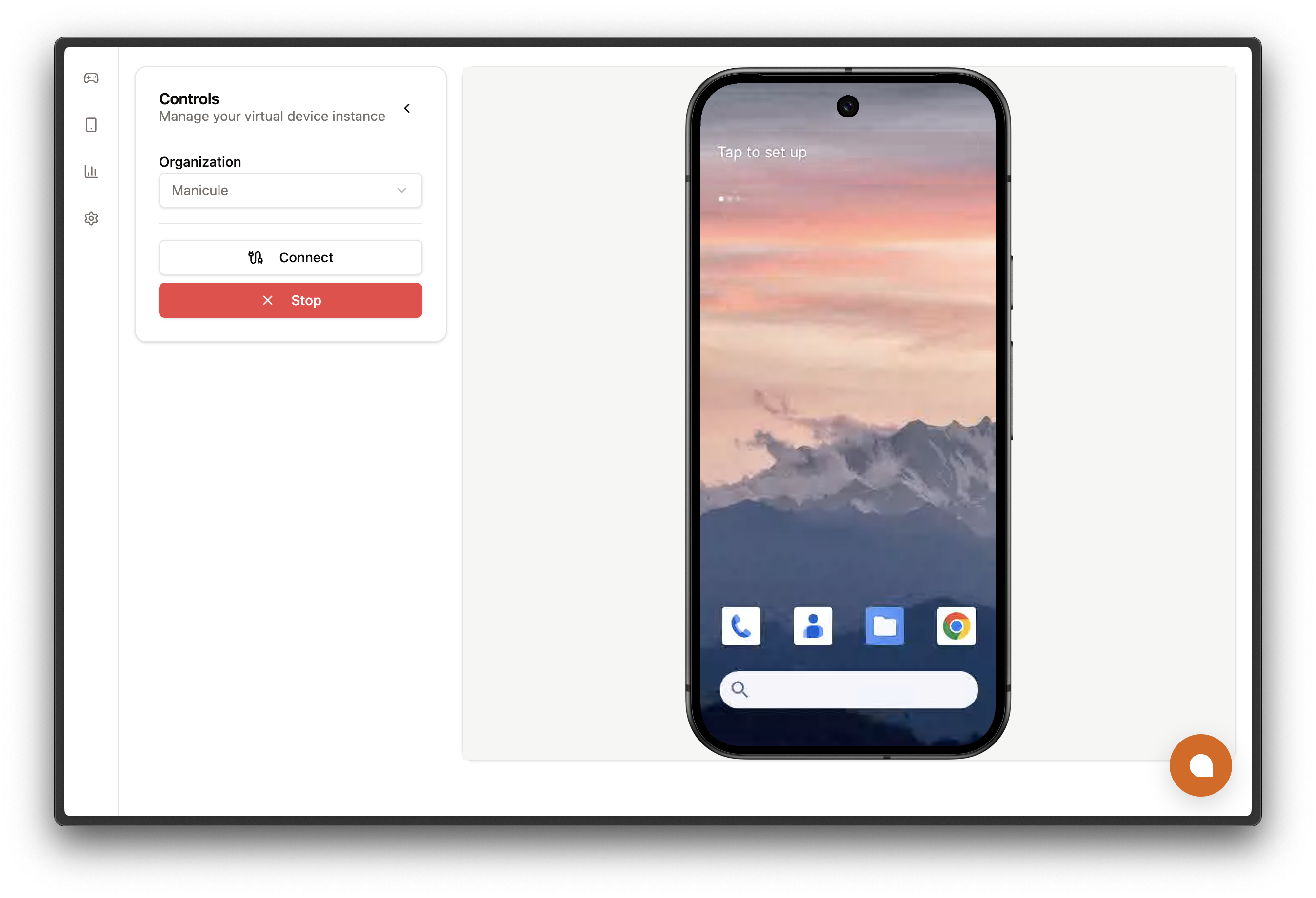
Limrun spins up real Android emulators in the cloud. Drive them from the LIM SDK, or open an Android Debug Bridge (`adb`) tunnel and use anything that speaks `adb`: Android Studio, Appium, scrcpy, your own shell scripts.
This page covers:
1. Starting an Android instance.
2. Connecting to it with the LIM SDK or `adb`.
3. Reading the screen and driving the device.
 ## Prerequisites
- **Install the `lim` CLI or one of the SDKs**
```bash
# npm
npm install --global @limrun/cli
# pnpm
pnpm add --global @limrun/cli
# bun
bun add --global @limrun/cli
```
```bash
# npm
npm install @limrun/api
# pnpm
pnpm add @limrun/api
# bun
bun add @limrun/api
```
```bash
go get -u github.com/limrun-inc/go-sdk@latest
```
```bash
pip install limrun_api
```
- **Get a Limrun API key** from the [Limrun console](https://console.limrun.com) and export it. The CLI and every SDK read this variable.
```bash
export LIM_API_KEY="lim_..."
```
- **(Optional) Install `adb`, if you plan to tunnel.** The Android Studio "Command-line tools" install ships it. On macOS, `brew install android-platform-tools`.
## SDK capability matrix
The three SDKs cover different slices of the Android surface. TypeScript ships the full device-control client; from Python and Go, drive the device over the `adb` tunnel.
| Capability | TypeScript | Python | Go |
|---|---|---|---|
| Instance CRUD | ✓ | ✓ | ✓ |
| Asset CRUD | ✓ | ✓ | ✓ |
| `assets.getOrUpload` (local file uploader) | ✓ | upload manually | ✓ |
| Provision Playwright-Android sub-sandbox | ✓ | ✓ | ✓ |
| Device-control client | ✓ | not exposed | not exposed |
| Screenshot, element tree | ✓ | use `adb` over the tunnel | use `adb` over the tunnel |
| Tap, type, scroll, open URL | ✓ | use `adb` over the tunnel | use `adb` over the tunnel |
| Video recording (`startRecording` / `stopRecording`) | ✓ | use `adb screenrecord` | use `adb screenrecord` |
| APK install | ✓ | use `adb install` | use `adb install` |
| Connection lifecycle | ✓ | not exposed | not exposed |
## Provision an instance
With the CLI or SDK set up and authenticated, provisioning is a simple command:
```bash
# Boot an instance and open an ADB tunnel (defaults: --connect=true).
lim android create
# Auto-delete the pod when this CLI process exits, and pin to a region with a label.
lim android create --rm --region us-west --label app=demo --label session=docs
# Pre-install a local APK (uploaded to Asset Storage first, MD5-deduplicated).
lim android create --install ./build.apk
# Reference an asset that's already in storage by name.
lim android create --install-asset chrome-stable
```
```ts
import { Limrun } from '@limrun/api';
const lim = new Limrun(); // reads LIM_API_KEY from the environment
const instance = await lim.androidInstances.create({
wait: true, // resolve only after status.state === 'ready'
reuseIfExists: true, // return the existing match instead of creating a new pod
metadata: { labels: { app: 'demo', session: 'docs' } },
spec: {
region: 'us-west', // optional; otherwise picked by clues + availability
inactivityTimeout: '10m', // 1m, 10m, 3h, ...
hardTimeout: '0', // '0' = no hard cap
clues: [{ kind: 'OSVersion', osVersion: '15' }], // '13' | '14' | '15'
},
});
console.log(instance.metadata.id, instance.status.state);
```
```go
import (
"context"
"os"
limrun "github.com/limrun-inc/go-sdk"
"github.com/limrun-inc/go-sdk/option"
"github.com/limrun-inc/go-sdk/packages/param"
)
lim := limrun.NewClient(option.WithAPIKey(os.Getenv("LIM_API_KEY")))
inst, _ := lim.AndroidInstances.New(ctx, limrun.AndroidInstanceNewParams{
Wait: param.NewOpt(true),
ReuseIfExists: param.NewOpt(true),
Metadata: limrun.AndroidInstanceNewParamsMetadata{
Labels: map[string]string{"app": "demo", "session": "docs"},
},
Spec: limrun.AndroidInstanceNewParamsSpec{
Region: param.NewOpt("us-west"),
InactivityTimeout: param.NewOpt("10m"),
HardTimeout: param.NewOpt("0"),
Clues: []limrun.AndroidInstanceNewParamsSpecClue{
{Kind: "OSVersion", OsVersion: param.NewOpt("15")},
},
},
})
```
```python
from limrun_api import Limrun
lim = Limrun() # reads LIM_API_KEY
instance = lim.android_instances.create(
wait=True,
reuse_if_exists=True,
metadata={"labels": {"app": "demo", "session": "docs"}},
spec={
"region": "us-west",
"inactivity_timeout": "10m",
"hard_timeout": "0",
"clues": [{"kind": "OSVersion", "os_version": "15"}],
},
)
```
### Create parameters
Flags for `lim android create`:
| Flag | Use this to |
|---|---|
| `--region ` | Pin the region (e.g. `us-west`). Otherwise scheduled by availability. |
| `--display-name ` | Set the human-readable name shown in the console. |
| `--label key=value` | Attach a metadata label. Repeat for multiple labels. |
| `--reuse-if-exists` | Return the existing instance with matching labels + region instead of creating a new pod. Defaults to `false`. |
| `--inactivity-timeout ` | Inactivity timeout (`1m`, `10m`, `3h`). Defaults to the organization setting. |
| `--hard-timeout ` | Forced termination after this wall-clock window. Defaults to no cap. |
| `--install ` | Pre-install a local APK while provisioning. Repeatable. See [Pre-install APKs](#pre-install-apks). |
| `--install-asset ` | Pre-install an APK that's already in Asset Storage. Repeatable. See [Pre-install APKs](#pre-install-apks). |
| `--rm` | Auto-delete the pod when the CLI process exits. Defaults to `false`. |
| `--connect / --no-connect` | Open the ADB tunnel after the instance is ready. Defaults to `true`. |
| `--adb-path ` | Point the CLI at a non-default `adb` binary. Defaults to `adb` (looked up on `PATH`). |
`spec.clues` and `spec.sandbox.playwrightAndroid` are SDK-only.
| Field | Type | Meaning |
|---|---|---|
| `wait` | boolean | When `true`, the call returns only after `status.state === 'ready'`. Without it, you'll need to poll. Defaults to `false`. |
| `reuseIfExists` | boolean | When `true`, return the existing instance with matching `metadata.labels` and `spec.region` instead of creating a new pod. Defaults to `false`. |
| `metadata.displayName` | string | Human-readable name surfaced in the web console alongside `metadata.id`. |
| `metadata.labels` | `Record` | Free-form `key=value` map for tagging and grouping. |
| `spec.region` | string | Pin region (e.g. `us-west`). When omitted, the scheduler picks based on `clues` plus availability. |
| `spec.inactivityTimeout` | duration string | `1m`, `10m`, `3h`, etc. Defaults to `3m`. Passing `'0'` defers to the organization-level default. |
| `spec.hardTimeout` | duration string | Forced termination after this wall-clock window. `'0'` means no cap; the pod runs until inactivity or explicit delete. Defaults to `0`. |
| `spec.clues[].kind` | `'ClientIP' \| 'OSVersion'` | Scheduling hint: bias by OS version or by user location. |
| `spec.clues[].clientIp` | string | Required when `kind: 'ClientIP'`. Set this to the IP of the end user whose browser will stream the emulator. The scheduler geolocates this IP and provisions in the nearest region for low-latency streaming. `spec.region` overrides this clue. |
| `spec.clues[].osVersion` | string | Required when `kind: 'OSVersion'`. One of `'13'`, `'14'`, `'15'`. |
| `spec.initialAssets[]` | array of `InitialAsset` | APKs to install while provisioning. See [Pre-install APKs](#pre-install-apks). |
| `spec.sandbox.playwrightAndroid.enabled` | boolean | Provision a Playwright-Android sub-sandbox alongside the emulator and surface its CDP URL on `status.sandbox.playwrightAndroid.url`. Defaults to `false`. See [Automated testing > Playwright](/docs/testing/playwright). |
### Pre-install APKs
Set `initialAssets` at provisioning time to install one or more APKs while the pod boots. Each APK must come from a publicly reachable HTTPS URL (a GitHub release asset, an S3 presigned URL) or Limrun's [Asset Storage](/platform/asset-storage/).
For local files, the CLI's `--install` and the TypeScript/Go SDK's `assets.getOrUpload({ path })` upload to Asset Storage first and hand the daemon a signed URL. Python's SDK doesn't ship that helper. Upload manually with `assets.get_or_create` plus a PUT to the returned upload URL before calling `create`. See [Asset Storage](/platform/asset-storage/).
```bash
# Local APK uploaded to Asset Storage on the fly, then installed.
lim android create --install ./build.apk
# Multiple unrelated apps; each --install becomes its own install group.
lim android create --install ./app-a.apk --install ./app-b.apk
# Already in Asset Storage? Reference it by name instead.
lim android create --install-asset chrome-stable
```
```ts
const instance = await lim.androidInstances.create({
wait: true,
reuseIfExists: true,
spec: {
initialAssets: [
// One asset by name (already uploaded via assets.getOrUpload)
{ kind: 'App', source: 'AssetName', assetName: 'my-app-build.apk' },
// Direct URLs, no Asset Storage upload required
{ kind: 'App', source: 'URL',
url: 'https://example.com/builds/123.apk' },
{ kind: 'App', source: 'URLs',
urls: ['https://example.com/base.apk', 'https://example.com/config.apk'] },
// Reference by asset ID (when you already have one)
{ kind: 'App', source: 'AssetIDs',
assetIds: ['asset_01j...'] },
],
},
});
```
```go
inst, _ := lim.AndroidInstances.New(ctx, limrun.AndroidInstanceNewParams{
Wait: param.NewOpt(true),
ReuseIfExists: param.NewOpt(true),
Spec: limrun.AndroidInstanceNewParamsSpec{
InitialAssets: []limrun.AndroidInstanceNewParamsSpecInitialAsset{
// One asset by name
{
Kind: "App",
Source: "AssetName",
AssetName: param.NewOpt("my-app-build.apk"),
},
// Direct URL
{
Kind: "App",
Source: "URL",
URL: param.NewOpt("https://example.com/builds/123.apk"),
},
// Multiple URLs as one install group
{
Kind: "App",
Source: "URLs",
URLs: []string{"https://example.com/base.apk", "https://example.com/config.apk"},
},
// Reference by asset ID
{
Kind: "App",
Source: "AssetIDs",
AssetIDs: []string{"asset_01j..."},
},
},
},
})
```
```python
instance = lim.android_instances.create(
wait=True,
reuse_if_exists=True,
spec={
"initial_assets": [
# One asset by name (already uploaded via assets.get_or_upload)
{"kind": "App", "source": "AssetName", "asset_name": "my-app-build.apk"},
# Direct URLs
{"kind": "App", "source": "URL",
"url": "https://example.com/builds/123.apk"},
{"kind": "App", "source": "URLs",
"urls": ["https://example.com/base.apk", "https://example.com/config.apk"]},
# Reference by asset ID
{"kind": "App", "source": "AssetIDs",
"asset_ids": ["asset_01j..."]},
],
},
)
```
#### Using Split APKs
If you ship your app as **split APKs**, ie a `base.apk` plus a few `config.*` APKs (`config.xxhdpi.apk` for screen density, `config.en.apk` for locale, `config.arm64_v8a.apk` for architecture, etc.), the whole set has to install as one atomic group or the app won't run. Pass them together by switching `source` to `AssetNames` or `URLs` and giving the entry an array. The first filename is treated as the base APK; the rest are config APKs.
**Split APKs are SDK-only.** Each CLI `--install` / `--install-asset` becomes its own `initialAssets[]` entry, so the set installs as separate apps rather than a grouped install. Use an SDK to keep them in one entry.
```ts
await lim.androidInstances.create({
wait: true,
spec: {
initialAssets: [
// From Asset Storage by name
{ kind: 'App', source: 'AssetNames',
assetNames: ['base.apk', 'config.xxhdpi.apk', 'config.en.apk'] },
// Or from any HTTPS URLs the daemon can reach
{ kind: 'App', source: 'URLs',
urls: [
'https://example.com/base.apk',
'https://example.com/config.xxhdpi.apk',
'https://example.com/config.en.apk',
] },
],
},
});
```
```go
inst, _ := lim.AndroidInstances.New(ctx, limrun.AndroidInstanceNewParams{
Wait: param.NewOpt(true),
Spec: limrun.AndroidInstanceNewParamsSpec{
InitialAssets: []limrun.AndroidInstanceNewParamsSpecInitialAsset{
{
Kind: "App",
Source: "AssetNames",
AssetNames: []string{"base.apk", "config.xxhdpi.apk", "config.en.apk"},
},
{
Kind: "App",
Source: "URLs",
URLs: []string{
"https://example.com/base.apk",
"https://example.com/config.xxhdpi.apk",
"https://example.com/config.en.apk",
},
},
},
},
})
```
```python
lim.android_instances.create(
wait=True,
spec={
"initial_assets": [
{"kind": "App", "source": "AssetNames",
"asset_names": ["base.apk", "config.xxhdpi.apk", "config.en.apk"]},
{"kind": "App", "source": "URLs",
"urls": [
"https://example.com/base.apk",
"https://example.com/config.xxhdpi.apk",
"https://example.com/config.en.apk",
]},
],
},
)
```
Use separate entries in `initialAssets` when you want to install unrelated apps in sequence; everything inside one entry is treated as a single grouped install.
#### Set up custom Chrome Flags
You can use Android's local Chrome's experimental features by turning on a specific flag. This is SDK-only. To do this, add an entry to `initialAssets` array with `kind: 'Configuration'`:
```ts
{
kind: 'Configuration',
configuration: {
kind: 'ChromeFlag',
chromeFlag: 'enable-command-line-on-non-rooted-devices@1',
},
}
```
```go
limrun.AndroidInstanceNewParamsSpecInitialAsset{
Kind: "Configuration",
Configuration: limrun.AndroidInstanceNewParamsSpecInitialAssetConfiguration{
Kind: "ChromeFlag",
ChromeFlag: "enable-command-line-on-non-rooted-devices@1",
},
}
```
```python
{
"kind": "Configuration",
"configuration": {
"kind": "ChromeFlag",
"chrome_flag": "enable-command-line-on-non-rooted-devices@1",
},
}
```
Anything you want to upload once and reuse goes through [Asset Storage](/docs/platform/asset-storage) first. For builds you want to push to an already-running pod, see [Install an APK](#install-an-apk).
### Example response
A successful `create` returns the full instance resource.
```json
{
"metadata": {
"id": "android_usw1_01krxvphn8e3rbeq0zewgw209a",
"createdAt": "2026-05-18T19:52:42Z",
"organizationId": "org_01kr52j...",
"displayName": "android_usw1_01krxvphn8e3rbeq0zewgw209a",
"labels": { "app": "demo", "session": "docs" }
},
"spec": {
"inactivityTimeout": "10m0s",
"region": "us-west"
},
"status": {
"state": "ready",
"apiUrl": "https://us-west-1-1234567.limrun.net/v1/android_usw1_01krxv.../api",
"adbWebSocketUrl": "wss://us-west-1-1234567.limrun.net/v1/organizations/org_01kr52j.../android.limrun.com/v1/instances/android_usw1_01krxv.../adbWebSocket",
"endpointWebSocketUrl": "wss://us-west-1-1234567.limrun.net/v1/organizations/org_01kr52j.../android.limrun.com/v1/instances/android_usw1_01krxv.../endpointWebSocket",
"signedStreamUrl": "https://console.limrun.com/signedStream?token=lim_...&url=wss%3A%2F%2Fus-west-1-1234567.limrun.net%2F...%2FendpointWebSocket",
"mcpUrl": "https://us-west-1-1234567.limrun.net/v1/android_usw1_01krxv.../mcp",
"targetHttpPortUrlPrefix": "wss://us-west-1-1234567.limrun.net/v1/organizations/org_01kr52j.../android.limrun.com/v1/instances/android_usw1_01krxv.../targetHttpPort",
"token": "lim_..."
}
}
```
#### Watch the livestream
- To watch the emulator stream, open `signedStreamUrl` in a browser. No need to login or get an API key.
- For an embedded experience inside your own app, see [Embed the simulator](/docs/platform/embed-simulator).
#### Field reference
| Field | Use |
|---|---|
| `metadata.id` | Stable instance identifier. Pass to `get`, `delete`, `connect`. |
| `metadata.labels` | Echoed back. Drives `reuseIfExists` matching and label-selector listing. |
| `spec.region` | Region the scheduler placed the pod in. |
| `status.state` | `unknown`, `creating`, `assigned`, `ready`, `terminated`. |
| `status.apiUrl` | HTTP base for the Android control daemon. WebSocket control derives from it (`apiUrl + /ws`). Pass to `createInstanceClient`. |
| `status.adbWebSocketUrl` | WebSocket endpoint for the ADB tunnel. Pass to `createInstanceClient` as `adbUrl`. |
| `status.endpointWebSocketUrl` | WebSocket endpoint for the [`` web component](/docs/platform/embed-simulator) (append `?token=`). |
| `status.signedStreamUrl` | Console-hosted watch URL with the token baked in. Open in a browser without your API key. |
| `status.mcpUrl` | Per-instance MCP HTTP endpoint. Authenticate with your **org API key**, not `status.token`. See [MCP](/docs/agents/mcp). |
| `status.targetHttpPortUrlPrefix` | WebSocket prefix (`wss://...`) for reaching HTTP services running on the device. Append your target port to forward traffic through. |
| `status.sandbox.playwrightAndroid.url` | Chrome DevTools Protocol URL when the Playwright sub-sandbox is enabled. |
| `status.token` | Per-instance bearer for `apiUrl`, `adbWebSocketUrl`, and `endpointWebSocketUrl`. Embedded in `signedStreamUrl`. |
## Connect to your instance
Two ways to drive the device:
1. **LIM SDK.** Opens a typed WebSocket session to the Android control daemon. Tight, ergonomic surface for the common moves (tap by selector, screenshot, element tree, record).
2. **ADB tunnel.** Exposes the emulator's `adb` socket as a local TCP listener. Anything that speaks `adb` attaches as if it were a USB device.
Use the SDK when you want strongly-typed results and built-in selectors. Use the ADB tunnel when you need the long tail of Android tooling (logcat, file push/pull, debugger attach, scrcpy, Appium) or you're calling from Go or Python.
| Capability | LIM SDK | ADB tunnel |
|---|---|---|
| Screenshot | `client.screenshot()` returns a base64 PNG data URI | `adb shell screencap -p > screen.png` |
| Read UI hierarchy | `client.getElementTree()` returns `AndroidElementNode[]` plus raw XML | `adb shell uiautomator dump`, then parse `/sdcard/window_dump.xml` |
| Find element by selector | `client.findElement(selector, limit?)` with typed `AndroidSelector` | dump the tree, then grep/parse XML manually |
| Tap by selector | `client.tap({ selector })` (server-side lookup + tap) | dump tree, parse bounds, then `adb shell input tap X Y` |
| Tap by coordinates | `client.tap({ x, y })` | `adb shell input tap X Y` |
| Type text | `client.setText(target?, 'hello')` | `adb shell input text 'hello'` |
| Press key (with modifiers) | `client.pressKey('HOME', ['shift'])` | `adb shell input keyevent KEYCODE_HOME` (no modifier syntax) |
| Scroll | `client.scrollScreen('down', 6)` / `scrollElement(target, ...)` | `adb shell input swipe X1 Y1 X2 Y2` |
| Open URL / deeplink | `client.openUrl('myapp://...')` | `adb shell am start -a android.intent.action.VIEW -d ` |
| Record video | `client.startRecording / stopRecording` with `localPath` / `presignedUrl` sinks | `adb shell screenrecord /sdcard/out.mp4` (3-minute cap per file), then `adb pull` |
| Install APK from HTTPS URL | `client.sendAsset(url)` (daemon downloads on the device side) | download locally, then `adb install ./out.apk` |
| Install APK from local file | `assets.getOrUpload({ path })` then `sendAsset(asset.signedDownloadUrl)` | `adb install ./build.apk` |
| Launch / force-stop app | not exposed | `adb shell am start -n pkg/.Activity` / `adb shell am force-stop pkg` |
| Logcat | not exposed | `adb logcat` |
| File push / pull | not exposed | `adb push local /sdcard/...` / `adb pull /sdcard/...` |
| Run arbitrary shell | not exposed | `adb shell ` |
| Mirror the device UI | use `signedStreamUrl` in a browser or `` | `scrcpy -s 127.0.0.1:` |
| Attach Android Studio / IDE | not applicable | pair Device Manager with `127.0.0.1:` |
| Drive with Appium | not applicable | point `appium:udid` at `127.0.0.1:` |
| Connection lifecycle | typed `getConnectionState` / `onConnectionStateChange` with auto-reconnect | adb-server's built-in retry; `adb reconnect` if it loses the socket |
| Languages | TypeScript (device control + tunnel); Go and Python: tunnel only | any language that can shell out to `adb` |
### Create a client for the LIM SDK
`createInstanceClient` opens a WebSocket to the Android control daemon. Every method on the returned client is one round-trip over that socket.
You'll need two fields from the `create` response:
- `status.apiUrl`. HTTP base for the daemon; the WebSocket URL is derived from it.
- `status.token`. Per-instance bearer.
```ts
import { createInstanceClient } from '@limrun/api';
const client = await createInstanceClient({
apiUrl: instance.status.apiUrl!,
token: instance.status.token,
logLevel: 'info',
});
```
| Option | What it controls |
|---|---|
| `apiUrl` | HTTP base for the Android control daemon. The WebSocket endpoint is derived as `apiUrl + /ws`. Recording downloads use the same base. Required. |
| `token` | Per-instance bearer sent as `Authorization: Bearer ` on the WebSocket handshake. Required. |
| `logLevel` | One of `'none' \| 'error' \| 'warn' \| 'info' \| 'debug'`. Logs are prefixed `[Endpoint]`. Defaults to `info`. |
| `maxReconnectAttempts` | Max consecutive reconnect attempts after a transient WebSocket drop before the client gives up. Defaults to `6`. |
| `reconnectDelay` | Initial backoff between reconnect attempts. Each attempt doubles, capped at `maxReconnectDelay`. Defaults to `1000` ms. |
| `maxReconnectDelay` | Upper bound on the exponential backoff window. Defaults to `30000` ms. |
The Go and Python SDKs don't currently expose a device-control client; from those languages, drive the device through the [ADB tunnel](#start-an-adb-tunnel) or call the REST surface directly.
### Start an ADB tunnel
`lim android connect` opens a long-lived WebSocket between your machine and the emulator's `adb` socket, binds it to a random `127.0.0.1` port, and runs `adb connect 127.0.0.1:` for you. The tunnel stays up until you `Ctrl+C`. The emulator then shows up under `adb devices` like any networked device.
```bash
# Connect to the last-created Android instance.
lim android connect
# Or target a specific instance (recommended for scripts).
lim android connect --id
# Point at a non-default adb binary.
lim android connect --id --adb-path /opt/homebrew/bin/adb
```
In another terminal, verify it's wired up and run anything `adb` understands:
```bash
adb devices
# List of devices attached
# 127.0.0.1:49923 device
adb -s 127.0.0.1:49923 shell getprop ro.build.version.release
# 15
```
Some tools that can work with `adb`:
- **Android Studio.** Open `Device Manager → Pair Device Using Wi-Fi`, point it at `127.0.0.1:`, and the emulator appears in the device picker. Run, debug, and Logcat flow through it.
- **scrcpy.** Run `scrcpy -s 127.0.0.1:` to mirror and remote-control the device.
- **Appium.** Set `appium:udid` (or `appium:deviceName`) to `127.0.0.1:` on any upstream Appium server. See [Automated testing > Appium](/docs/testing/appium).
## Read the screen
Three primitives for inspecting the device using the SDK. All of these require an initiated `client`:
- Take a screenshot
- Capture screenrecordings
- Get element tree in a screen
### Take a screenshot
`screenshot` captures the current frame as a base64-encoded PNG. The CLI writes the decoded bytes to a path you supply; the SDK returns a data URI that you decode yourself.
```bash
lim android screenshot screen.png
lim android screenshot screen.png --id
```
```ts
const shot = await client.screenshot();
// { dataUri: 'data:image/png;base64,iVBORw0K...' }
import { writeFileSync } from 'node:fs';
const png = Buffer.from(shot.dataUri.replace(/^data:image\/\w+;base64,/, ''), 'base64');
writeFileSync('screen.png', png);
```
### Record the screen
Recording is server-side and writes to the emulator's filesystem. Start a recording, drive the UI, then stop. The output is H.264 in an mp4 container.
```bash
lim android record start --quality 5
# ...drive the UI...
# Download to a local file (default: timestamped mp4 in cwd).
lim android record stop -o demo.mp4
# Or hand the bytes to a presigned upload URL.
lim android record stop --presigned-url https://example.com/upload
```
```ts
await client.startRecording({ quality: 5 });
// ...drive the UI...
const url = await client.stopRecording({ localPath: '/tmp/demo.mp4' });
// url is also returned so you can re-fetch later
```
`quality` accepts the integers `5` through `10`. Higher values increase bitrate and file size.
On the SDK, pick the sink that matches where the file should live:
- **Local file.** `stopRecording({ localPath })`. The server returns the file; the SDK streams it to `localPath` before resolving.
- **Your bucket.** `stopRecording({ presignedUrl })`. The server PUTs directly to your URL; the SDK only waits for that upload.
- **Just the URL.** `stopRecording({})`. Resolves with the download URL; fetch the bytes later with `Authorization: Bearer ${status.token}`.
### Get the element tree
```bash
# Print the raw XML.
lim android element-tree
# Or get the parsed nodes as JSON (agent-friendly).
lim android element-tree --json
```
```ts
const tree = await client.getElementTree();
// tree.xml raw UIAutomator XML
// tree.nodes flattened AndroidElementNode[]
```
Sample raw `tree.xml` output:
```xml
```
Sample `tree.nodes` output:
```json
{
"index": "3",
"text": "Chrome",
"resourceId": "",
"className": "android.widget.TextView",
"packageName": "app.lawnchair",
"contentDesc": "Chrome",
"clickable": true,
"enabled": true,
"focusable": true,
"focused": false,
"scrollable": false,
"selected": false,
"bounds": "[533,1222][706,1422]",
"parsedBounds": {
"left": 533, "top": 1222, "right": 706, "bottom": 1422,
"centerX": 619, "centerY": 1322
}
}
```
## Control the device
Input actions need a way to specify what to act on. That shape is `AndroidElementTarget`, which carries either a selector or explicit coordinates.
```ts
type AndroidElementTarget = {
selector?: AndroidSelector;
x?: number;
y?: number;
};
```
Prefer selectors. Layouts shift between OS versions; coordinates don't survive that.
### Install an APK
`sendAsset(url)` tells the daemon to download an APK and install it. The URL has to be publicly reachable (a GitHub release asset, an S3 presigned URL) or come from Limrun's [Asset Storage](/platform/asset-storage/).
The CLI's `lim android install-app` accepts either a path or a URL: paths are uploaded to Asset Storage first (MD5-deduplicated), URLs are passed straight to the daemon. From TypeScript / Go, upload local files with `assets.getOrUpload({ path })` and pass the returned `signedDownloadUrl` to `sendAsset`. Python users upload manually with `assets.get_or_create` plus a PUT before calling `sendAsset`. See [Asset Storage](/platform/asset-storage/).
```bash
# Local path: uploaded to Asset Storage first, then installed.
lim android install-app ./build.apk
# Remote URL: passed straight to the daemon.
lim android install-app https://example.com/build.apk --id
```
```ts
// Local file: upload once, then install via the returned signed URL.
const asset = await lim.assets.getOrUpload({ path: './build.apk' });
await client.sendAsset(asset.signedDownloadUrl);
// Or install straight from a public URL.
await client.sendAsset('https://example.com/build.apk');
// Default request timeout is 120s. Pass a custom timeout for larger APKs.
await client.sendAsset(asset.signedDownloadUrl, 180_000);
```
### Select an element
`findElement` queries the tree without you having to parse it. Every non-empty selector field is ANDed together.
```bash
# Find by text, return up to 5 matches as JSON.
lim android find-element --text "Sign In" --limit 5 --json
# Find by resource id; defaults to up to 20 matches.
lim android find-element --resource-id com.example:id/submit
# Filter for clickable buttons that are enabled.
lim android find-element --class-name android.widget.Button --clickable --enabled
```
```ts
const r = await client.findElement({ text: 'Chrome' }, 5);
// { count: 1, elements: [ { ... AndroidElementNode } ] }
```
Selector fields (SDK key on the left, equivalent CLI flag on the right):
| SDK field | CLI flag | Matches |
|---|---|---|
| `resourceId` | `--resource-id ` | `android:id/...` resource string. Most stable selector. |
| `text` | `--text ` | Visible text. Case-sensitive exact match. |
| `contentDesc` | `--content-desc ` | Accessibility content description. |
| `className` | `--class-name ` | Widget class (`android.widget.Button`, `androidx.viewpager.widget.ViewPager`, etc.). |
| `packageName` | `--package-name ` | Owning app package. Useful to scope queries when the launcher is in front. |
| `index` | `--index ` | Sibling index. |
| `clickable` | `--clickable / --no-clickable` | Filter to clickable nodes only. |
| `enabled` | `--enabled / --no-enabled` | Skip disabled controls. |
| `focused` | `--focused / --no-focused` | Find the currently focused control. |
| `boundsContains` | `--bounds-contains-x --bounds-contains-y ` | Find the deepest node whose bounds contain that pixel. |
### Tap, type, or press
```bash
# Tap by selector (preferred). Pass any selector flag from the table above.
lim android tap-element --resource-id com.example.app:id/login
lim android tap-element --text "Sign In"
# Tap by raw coordinates (fallback).
lim android tap 374 219
# Type into the focused field, or into a specific input via selector / coords.
lim android type "hello"
lim android type "docs sandbox" --class-name android.widget.EditText
lim android type "hello" --x 120 --y 340
# Hardware and IME keys; --modifier is repeatable.
lim android press-key HOME
lim android press-key BACK
lim android press-key enter
lim android press-key a --modifier shift
```
```ts
// Tap by selector (preferred)
await client.tap({ selector: { resourceId: 'com.example.app:id/login' } });
await client.tap({ selector: { text: 'Chrome' } });
// Tap by coords (fallback)
await client.tap({ x: 374, y: 219 });
// Type into the currently focused field, or into a specific input
await client.setText(undefined, 'hello');
await client.setText(
{ selector: { className: 'android.widget.EditText' } },
'docs sandbox',
);
// Hardware and IME keys
await client.pressKey('HOME'); // returns { key: 'KEYCODE_HOME' }
await client.pressKey('BACK');
await client.pressKey('ENTER');
await client.pressKey('a', ['shift']); // modifiers: shift, ctrl/control, alt/option, meta/command/cmd, sym, fn
```
`pressKey` accepts plain names (`BACK`, `ENTER`, `A`, `TAB`), digit strings (`'4'`), or fully-qualified `KEYCODE_*` constants. The response echoes the resolved keycode so you can confirm what fired.
### Scroll
`scrollScreen` performs a finger-swipe gesture from the screen center. `scrollElement` (CLI: pass selector flags to `lim android scroll`) scrolls inside a specific scrollable node such as a list, ViewPager, or ScrollView. Both take a direction and an `amount` in Android scroll units.
```bash
# Scroll the screen. --amount defaults to 300 in the CLI.
lim android scroll down --amount 500
lim android scroll up
# Scroll inside a specific element by selector or coords.
lim android scroll down --resource-id com.example:id/list --amount 500
lim android scroll up --x 120 --y 500 --amount 250
```
```ts
// SDK amount defaults to 6.
await client.scrollScreen('down', 6);
await client.scrollScreen('up');
await client.scrollScreen('left', 4);
await client.scrollElement(
{ selector: { className: 'android.widget.ScrollView' } },
'down',
3,
);
```
Valid directions: `'up' | 'down' | 'left' | 'right'`. The SDK call resolves with the gesture's start and end points so you can sanity-check what landed on the wire:
```json
{ "direction": "down", "startX": 360, "startY": 808, "endX": 360, "endY": 1108 }
```
The SDK defaults `amount` to `6` (small flick); the CLI defaults to `300` (a hefty scroll). The field on the wire is the same; pass the same number to both for identical behavior.
### Open URLs
`openUrl` resolves the intent the same way `am start -a android.intent.action.VIEW -d ` would. It works for web URLs and registered deeplink schemes.
```bash
lim android open-url https://example.com
lim android open-url myapp://orders/42 --id
```
```ts
await client.openUrl('https://example.com'); // launches in the default browser
await client.openUrl('myapp://orders/42'); // routes to your app's deeplink handler
```
If no installed activity matches the intent, the daemon rejects with `startActivity returned code -91` (Android's `ActivityManager.START_INTENT_NOT_RESOLVED`). This catches unregistered custom schemes (`myapp://...`) and standard schemes whose handler isn't on the base image. On the stock image, `mailto:` fails (no mail app), while `tel:` and `https://` succeed (dialer + Chrome are present). Install the missing handler via [Pre-install APKs](#pre-install-apks) at boot, or [Install an APK](#install-an-apk) on a running pod.
## Manage the connection
The TypeScript client exposes lifecycle hooks for long-running drivers and connection debugging.
### Keep-alive
The client auto-pings the WebSocket every 30 seconds and surfaces state changes through a callback. Use `keepAlive` for an explicit application-level ping (during a long idle stretch, before a known-flaky network transition), and `getConnectionState` / `onConnectionStateChange` to observe.
```ts
client.getConnectionState();
// 'connecting' | 'connected' | 'disconnected' | 'reconnecting'
const unsubscribe = client.onConnectionStateChange((state) => {
console.log('state →', state);
});
client.keepAlive(); // explicit application-level ping
```
The SDK auto-reconnects on transient failures with exponential backoff (defaults: 6 attempts, 1 s base, 30 s cap).
### Disconnect
`disconnect` closes the WebSocket cleanly and disables auto-reconnect. It does not delete the instance; the emulator keeps running until its inactivity or hard timeout fires.
```ts
client.disconnect();
unsubscribe(); // drop the state callback if you no longer need it
```
### Delete
Each Android instance is single-tenant: only one client should drive it at a time. Scope instances per user, per PR, or per session with labels, then let `reuseIfExists` return the same warm pod on the next call. Tear down explicitly when you're done, or clean up by label selector across a tenant.
```bash
lim android list # all ready instances (use --all for every state)
lim android list --label-selector user=alice
lim android delete # tear down a specific instance
lim android delete # tear down the last-created instance
```
```ts
// Single instance
await lim.androidInstances.delete(instance.metadata.id);
// Or every instance matching a label
for await (const inst of lim.androidInstances.list({
labelSelector: `user=${userId}`,
state: 'ready',
})) {
await lim.androidInstances.delete(inst.metadata.id);
}
```
```go
// Single instance
_ = lim.AndroidInstances.Delete(ctx, inst.Metadata.ID)
```
The inactivity timeout fires if nobody talks to the daemon for that long. The hard timeout fires regardless. Set both to your tolerance for orphaned pods.
## See also
Wire any upstream Appium server to the ADB tunnel for native or hybrid Android tests.
Drive Chrome on the emulator with Playwright via the `playwrightAndroid` sub-sandbox.
Stream the live emulator into your web app with ``.
Upload APKs once, reuse them across instances via `initialAssets`.
## Prerequisites
- **Install the `lim` CLI or one of the SDKs**
```bash
# npm
npm install --global @limrun/cli
# pnpm
pnpm add --global @limrun/cli
# bun
bun add --global @limrun/cli
```
```bash
# npm
npm install @limrun/api
# pnpm
pnpm add @limrun/api
# bun
bun add @limrun/api
```
```bash
go get -u github.com/limrun-inc/go-sdk@latest
```
```bash
pip install limrun_api
```
- **Get a Limrun API key** from the [Limrun console](https://console.limrun.com) and export it. The CLI and every SDK read this variable.
```bash
export LIM_API_KEY="lim_..."
```
- **(Optional) Install `adb`, if you plan to tunnel.** The Android Studio "Command-line tools" install ships it. On macOS, `brew install android-platform-tools`.
## SDK capability matrix
The three SDKs cover different slices of the Android surface. TypeScript ships the full device-control client; from Python and Go, drive the device over the `adb` tunnel.
| Capability | TypeScript | Python | Go |
|---|---|---|---|
| Instance CRUD | ✓ | ✓ | ✓ |
| Asset CRUD | ✓ | ✓ | ✓ |
| `assets.getOrUpload` (local file uploader) | ✓ | upload manually | ✓ |
| Provision Playwright-Android sub-sandbox | ✓ | ✓ | ✓ |
| Device-control client | ✓ | not exposed | not exposed |
| Screenshot, element tree | ✓ | use `adb` over the tunnel | use `adb` over the tunnel |
| Tap, type, scroll, open URL | ✓ | use `adb` over the tunnel | use `adb` over the tunnel |
| Video recording (`startRecording` / `stopRecording`) | ✓ | use `adb screenrecord` | use `adb screenrecord` |
| APK install | ✓ | use `adb install` | use `adb install` |
| Connection lifecycle | ✓ | not exposed | not exposed |
## Provision an instance
With the CLI or SDK set up and authenticated, provisioning is a simple command:
```bash
# Boot an instance and open an ADB tunnel (defaults: --connect=true).
lim android create
# Auto-delete the pod when this CLI process exits, and pin to a region with a label.
lim android create --rm --region us-west --label app=demo --label session=docs
# Pre-install a local APK (uploaded to Asset Storage first, MD5-deduplicated).
lim android create --install ./build.apk
# Reference an asset that's already in storage by name.
lim android create --install-asset chrome-stable
```
```ts
import { Limrun } from '@limrun/api';
const lim = new Limrun(); // reads LIM_API_KEY from the environment
const instance = await lim.androidInstances.create({
wait: true, // resolve only after status.state === 'ready'
reuseIfExists: true, // return the existing match instead of creating a new pod
metadata: { labels: { app: 'demo', session: 'docs' } },
spec: {
region: 'us-west', // optional; otherwise picked by clues + availability
inactivityTimeout: '10m', // 1m, 10m, 3h, ...
hardTimeout: '0', // '0' = no hard cap
clues: [{ kind: 'OSVersion', osVersion: '15' }], // '13' | '14' | '15'
},
});
console.log(instance.metadata.id, instance.status.state);
```
```go
import (
"context"
"os"
limrun "github.com/limrun-inc/go-sdk"
"github.com/limrun-inc/go-sdk/option"
"github.com/limrun-inc/go-sdk/packages/param"
)
lim := limrun.NewClient(option.WithAPIKey(os.Getenv("LIM_API_KEY")))
inst, _ := lim.AndroidInstances.New(ctx, limrun.AndroidInstanceNewParams{
Wait: param.NewOpt(true),
ReuseIfExists: param.NewOpt(true),
Metadata: limrun.AndroidInstanceNewParamsMetadata{
Labels: map[string]string{"app": "demo", "session": "docs"},
},
Spec: limrun.AndroidInstanceNewParamsSpec{
Region: param.NewOpt("us-west"),
InactivityTimeout: param.NewOpt("10m"),
HardTimeout: param.NewOpt("0"),
Clues: []limrun.AndroidInstanceNewParamsSpecClue{
{Kind: "OSVersion", OsVersion: param.NewOpt("15")},
},
},
})
```
```python
from limrun_api import Limrun
lim = Limrun() # reads LIM_API_KEY
instance = lim.android_instances.create(
wait=True,
reuse_if_exists=True,
metadata={"labels": {"app": "demo", "session": "docs"}},
spec={
"region": "us-west",
"inactivity_timeout": "10m",
"hard_timeout": "0",
"clues": [{"kind": "OSVersion", "os_version": "15"}],
},
)
```
### Create parameters
Flags for `lim android create`:
| Flag | Use this to |
|---|---|
| `--region ` | Pin the region (e.g. `us-west`). Otherwise scheduled by availability. |
| `--display-name ` | Set the human-readable name shown in the console. |
| `--label key=value` | Attach a metadata label. Repeat for multiple labels. |
| `--reuse-if-exists` | Return the existing instance with matching labels + region instead of creating a new pod. Defaults to `false`. |
| `--inactivity-timeout ` | Inactivity timeout (`1m`, `10m`, `3h`). Defaults to the organization setting. |
| `--hard-timeout ` | Forced termination after this wall-clock window. Defaults to no cap. |
| `--install ` | Pre-install a local APK while provisioning. Repeatable. See [Pre-install APKs](#pre-install-apks). |
| `--install-asset ` | Pre-install an APK that's already in Asset Storage. Repeatable. See [Pre-install APKs](#pre-install-apks). |
| `--rm` | Auto-delete the pod when the CLI process exits. Defaults to `false`. |
| `--connect / --no-connect` | Open the ADB tunnel after the instance is ready. Defaults to `true`. |
| `--adb-path ` | Point the CLI at a non-default `adb` binary. Defaults to `adb` (looked up on `PATH`). |
`spec.clues` and `spec.sandbox.playwrightAndroid` are SDK-only.
| Field | Type | Meaning |
|---|---|---|
| `wait` | boolean | When `true`, the call returns only after `status.state === 'ready'`. Without it, you'll need to poll. Defaults to `false`. |
| `reuseIfExists` | boolean | When `true`, return the existing instance with matching `metadata.labels` and `spec.region` instead of creating a new pod. Defaults to `false`. |
| `metadata.displayName` | string | Human-readable name surfaced in the web console alongside `metadata.id`. |
| `metadata.labels` | `Record` | Free-form `key=value` map for tagging and grouping. |
| `spec.region` | string | Pin region (e.g. `us-west`). When omitted, the scheduler picks based on `clues` plus availability. |
| `spec.inactivityTimeout` | duration string | `1m`, `10m`, `3h`, etc. Defaults to `3m`. Passing `'0'` defers to the organization-level default. |
| `spec.hardTimeout` | duration string | Forced termination after this wall-clock window. `'0'` means no cap; the pod runs until inactivity or explicit delete. Defaults to `0`. |
| `spec.clues[].kind` | `'ClientIP' \| 'OSVersion'` | Scheduling hint: bias by OS version or by user location. |
| `spec.clues[].clientIp` | string | Required when `kind: 'ClientIP'`. Set this to the IP of the end user whose browser will stream the emulator. The scheduler geolocates this IP and provisions in the nearest region for low-latency streaming. `spec.region` overrides this clue. |
| `spec.clues[].osVersion` | string | Required when `kind: 'OSVersion'`. One of `'13'`, `'14'`, `'15'`. |
| `spec.initialAssets[]` | array of `InitialAsset` | APKs to install while provisioning. See [Pre-install APKs](#pre-install-apks). |
| `spec.sandbox.playwrightAndroid.enabled` | boolean | Provision a Playwright-Android sub-sandbox alongside the emulator and surface its CDP URL on `status.sandbox.playwrightAndroid.url`. Defaults to `false`. See [Automated testing > Playwright](/docs/testing/playwright). |
### Pre-install APKs
Set `initialAssets` at provisioning time to install one or more APKs while the pod boots. Each APK must come from a publicly reachable HTTPS URL (a GitHub release asset, an S3 presigned URL) or Limrun's [Asset Storage](/platform/asset-storage/).
For local files, the CLI's `--install` and the TypeScript/Go SDK's `assets.getOrUpload({ path })` upload to Asset Storage first and hand the daemon a signed URL. Python's SDK doesn't ship that helper. Upload manually with `assets.get_or_create` plus a PUT to the returned upload URL before calling `create`. See [Asset Storage](/platform/asset-storage/).
```bash
# Local APK uploaded to Asset Storage on the fly, then installed.
lim android create --install ./build.apk
# Multiple unrelated apps; each --install becomes its own install group.
lim android create --install ./app-a.apk --install ./app-b.apk
# Already in Asset Storage? Reference it by name instead.
lim android create --install-asset chrome-stable
```
```ts
const instance = await lim.androidInstances.create({
wait: true,
reuseIfExists: true,
spec: {
initialAssets: [
// One asset by name (already uploaded via assets.getOrUpload)
{ kind: 'App', source: 'AssetName', assetName: 'my-app-build.apk' },
// Direct URLs, no Asset Storage upload required
{ kind: 'App', source: 'URL',
url: 'https://example.com/builds/123.apk' },
{ kind: 'App', source: 'URLs',
urls: ['https://example.com/base.apk', 'https://example.com/config.apk'] },
// Reference by asset ID (when you already have one)
{ kind: 'App', source: 'AssetIDs',
assetIds: ['asset_01j...'] },
],
},
});
```
```go
inst, _ := lim.AndroidInstances.New(ctx, limrun.AndroidInstanceNewParams{
Wait: param.NewOpt(true),
ReuseIfExists: param.NewOpt(true),
Spec: limrun.AndroidInstanceNewParamsSpec{
InitialAssets: []limrun.AndroidInstanceNewParamsSpecInitialAsset{
// One asset by name
{
Kind: "App",
Source: "AssetName",
AssetName: param.NewOpt("my-app-build.apk"),
},
// Direct URL
{
Kind: "App",
Source: "URL",
URL: param.NewOpt("https://example.com/builds/123.apk"),
},
// Multiple URLs as one install group
{
Kind: "App",
Source: "URLs",
URLs: []string{"https://example.com/base.apk", "https://example.com/config.apk"},
},
// Reference by asset ID
{
Kind: "App",
Source: "AssetIDs",
AssetIDs: []string{"asset_01j..."},
},
},
},
})
```
```python
instance = lim.android_instances.create(
wait=True,
reuse_if_exists=True,
spec={
"initial_assets": [
# One asset by name (already uploaded via assets.get_or_upload)
{"kind": "App", "source": "AssetName", "asset_name": "my-app-build.apk"},
# Direct URLs
{"kind": "App", "source": "URL",
"url": "https://example.com/builds/123.apk"},
{"kind": "App", "source": "URLs",
"urls": ["https://example.com/base.apk", "https://example.com/config.apk"]},
# Reference by asset ID
{"kind": "App", "source": "AssetIDs",
"asset_ids": ["asset_01j..."]},
],
},
)
```
#### Using Split APKs
If you ship your app as **split APKs**, ie a `base.apk` plus a few `config.*` APKs (`config.xxhdpi.apk` for screen density, `config.en.apk` for locale, `config.arm64_v8a.apk` for architecture, etc.), the whole set has to install as one atomic group or the app won't run. Pass them together by switching `source` to `AssetNames` or `URLs` and giving the entry an array. The first filename is treated as the base APK; the rest are config APKs.
**Split APKs are SDK-only.** Each CLI `--install` / `--install-asset` becomes its own `initialAssets[]` entry, so the set installs as separate apps rather than a grouped install. Use an SDK to keep them in one entry.
```ts
await lim.androidInstances.create({
wait: true,
spec: {
initialAssets: [
// From Asset Storage by name
{ kind: 'App', source: 'AssetNames',
assetNames: ['base.apk', 'config.xxhdpi.apk', 'config.en.apk'] },
// Or from any HTTPS URLs the daemon can reach
{ kind: 'App', source: 'URLs',
urls: [
'https://example.com/base.apk',
'https://example.com/config.xxhdpi.apk',
'https://example.com/config.en.apk',
] },
],
},
});
```
```go
inst, _ := lim.AndroidInstances.New(ctx, limrun.AndroidInstanceNewParams{
Wait: param.NewOpt(true),
Spec: limrun.AndroidInstanceNewParamsSpec{
InitialAssets: []limrun.AndroidInstanceNewParamsSpecInitialAsset{
{
Kind: "App",
Source: "AssetNames",
AssetNames: []string{"base.apk", "config.xxhdpi.apk", "config.en.apk"},
},
{
Kind: "App",
Source: "URLs",
URLs: []string{
"https://example.com/base.apk",
"https://example.com/config.xxhdpi.apk",
"https://example.com/config.en.apk",
},
},
},
},
})
```
```python
lim.android_instances.create(
wait=True,
spec={
"initial_assets": [
{"kind": "App", "source": "AssetNames",
"asset_names": ["base.apk", "config.xxhdpi.apk", "config.en.apk"]},
{"kind": "App", "source": "URLs",
"urls": [
"https://example.com/base.apk",
"https://example.com/config.xxhdpi.apk",
"https://example.com/config.en.apk",
]},
],
},
)
```
Use separate entries in `initialAssets` when you want to install unrelated apps in sequence; everything inside one entry is treated as a single grouped install.
#### Set up custom Chrome Flags
You can use Android's local Chrome's experimental features by turning on a specific flag. This is SDK-only. To do this, add an entry to `initialAssets` array with `kind: 'Configuration'`:
```ts
{
kind: 'Configuration',
configuration: {
kind: 'ChromeFlag',
chromeFlag: 'enable-command-line-on-non-rooted-devices@1',
},
}
```
```go
limrun.AndroidInstanceNewParamsSpecInitialAsset{
Kind: "Configuration",
Configuration: limrun.AndroidInstanceNewParamsSpecInitialAssetConfiguration{
Kind: "ChromeFlag",
ChromeFlag: "enable-command-line-on-non-rooted-devices@1",
},
}
```
```python
{
"kind": "Configuration",
"configuration": {
"kind": "ChromeFlag",
"chrome_flag": "enable-command-line-on-non-rooted-devices@1",
},
}
```
Anything you want to upload once and reuse goes through [Asset Storage](/docs/platform/asset-storage) first. For builds you want to push to an already-running pod, see [Install an APK](#install-an-apk).
### Example response
A successful `create` returns the full instance resource.
```json
{
"metadata": {
"id": "android_usw1_01krxvphn8e3rbeq0zewgw209a",
"createdAt": "2026-05-18T19:52:42Z",
"organizationId": "org_01kr52j...",
"displayName": "android_usw1_01krxvphn8e3rbeq0zewgw209a",
"labels": { "app": "demo", "session": "docs" }
},
"spec": {
"inactivityTimeout": "10m0s",
"region": "us-west"
},
"status": {
"state": "ready",
"apiUrl": "https://us-west-1-1234567.limrun.net/v1/android_usw1_01krxv.../api",
"adbWebSocketUrl": "wss://us-west-1-1234567.limrun.net/v1/organizations/org_01kr52j.../android.limrun.com/v1/instances/android_usw1_01krxv.../adbWebSocket",
"endpointWebSocketUrl": "wss://us-west-1-1234567.limrun.net/v1/organizations/org_01kr52j.../android.limrun.com/v1/instances/android_usw1_01krxv.../endpointWebSocket",
"signedStreamUrl": "https://console.limrun.com/signedStream?token=lim_...&url=wss%3A%2F%2Fus-west-1-1234567.limrun.net%2F...%2FendpointWebSocket",
"mcpUrl": "https://us-west-1-1234567.limrun.net/v1/android_usw1_01krxv.../mcp",
"targetHttpPortUrlPrefix": "wss://us-west-1-1234567.limrun.net/v1/organizations/org_01kr52j.../android.limrun.com/v1/instances/android_usw1_01krxv.../targetHttpPort",
"token": "lim_..."
}
}
```
#### Watch the livestream
- To watch the emulator stream, open `signedStreamUrl` in a browser. No need to login or get an API key.
- For an embedded experience inside your own app, see [Embed the simulator](/docs/platform/embed-simulator).
#### Field reference
| Field | Use |
|---|---|
| `metadata.id` | Stable instance identifier. Pass to `get`, `delete`, `connect`. |
| `metadata.labels` | Echoed back. Drives `reuseIfExists` matching and label-selector listing. |
| `spec.region` | Region the scheduler placed the pod in. |
| `status.state` | `unknown`, `creating`, `assigned`, `ready`, `terminated`. |
| `status.apiUrl` | HTTP base for the Android control daemon. WebSocket control derives from it (`apiUrl + /ws`). Pass to `createInstanceClient`. |
| `status.adbWebSocketUrl` | WebSocket endpoint for the ADB tunnel. Pass to `createInstanceClient` as `adbUrl`. |
| `status.endpointWebSocketUrl` | WebSocket endpoint for the [`` web component](/docs/platform/embed-simulator) (append `?token=`). |
| `status.signedStreamUrl` | Console-hosted watch URL with the token baked in. Open in a browser without your API key. |
| `status.mcpUrl` | Per-instance MCP HTTP endpoint. Authenticate with your **org API key**, not `status.token`. See [MCP](/docs/agents/mcp). |
| `status.targetHttpPortUrlPrefix` | WebSocket prefix (`wss://...`) for reaching HTTP services running on the device. Append your target port to forward traffic through. |
| `status.sandbox.playwrightAndroid.url` | Chrome DevTools Protocol URL when the Playwright sub-sandbox is enabled. |
| `status.token` | Per-instance bearer for `apiUrl`, `adbWebSocketUrl`, and `endpointWebSocketUrl`. Embedded in `signedStreamUrl`. |
## Connect to your instance
Two ways to drive the device:
1. **LIM SDK.** Opens a typed WebSocket session to the Android control daemon. Tight, ergonomic surface for the common moves (tap by selector, screenshot, element tree, record).
2. **ADB tunnel.** Exposes the emulator's `adb` socket as a local TCP listener. Anything that speaks `adb` attaches as if it were a USB device.
Use the SDK when you want strongly-typed results and built-in selectors. Use the ADB tunnel when you need the long tail of Android tooling (logcat, file push/pull, debugger attach, scrcpy, Appium) or you're calling from Go or Python.
| Capability | LIM SDK | ADB tunnel |
|---|---|---|
| Screenshot | `client.screenshot()` returns a base64 PNG data URI | `adb shell screencap -p > screen.png` |
| Read UI hierarchy | `client.getElementTree()` returns `AndroidElementNode[]` plus raw XML | `adb shell uiautomator dump`, then parse `/sdcard/window_dump.xml` |
| Find element by selector | `client.findElement(selector, limit?)` with typed `AndroidSelector` | dump the tree, then grep/parse XML manually |
| Tap by selector | `client.tap({ selector })` (server-side lookup + tap) | dump tree, parse bounds, then `adb shell input tap X Y` |
| Tap by coordinates | `client.tap({ x, y })` | `adb shell input tap X Y` |
| Type text | `client.setText(target?, 'hello')` | `adb shell input text 'hello'` |
| Press key (with modifiers) | `client.pressKey('HOME', ['shift'])` | `adb shell input keyevent KEYCODE_HOME` (no modifier syntax) |
| Scroll | `client.scrollScreen('down', 6)` / `scrollElement(target, ...)` | `adb shell input swipe X1 Y1 X2 Y2` |
| Open URL / deeplink | `client.openUrl('myapp://...')` | `adb shell am start -a android.intent.action.VIEW -d ` |
| Record video | `client.startRecording / stopRecording` with `localPath` / `presignedUrl` sinks | `adb shell screenrecord /sdcard/out.mp4` (3-minute cap per file), then `adb pull` |
| Install APK from HTTPS URL | `client.sendAsset(url)` (daemon downloads on the device side) | download locally, then `adb install ./out.apk` |
| Install APK from local file | `assets.getOrUpload({ path })` then `sendAsset(asset.signedDownloadUrl)` | `adb install ./build.apk` |
| Launch / force-stop app | not exposed | `adb shell am start -n pkg/.Activity` / `adb shell am force-stop pkg` |
| Logcat | not exposed | `adb logcat` |
| File push / pull | not exposed | `adb push local /sdcard/...` / `adb pull /sdcard/...` |
| Run arbitrary shell | not exposed | `adb shell ` |
| Mirror the device UI | use `signedStreamUrl` in a browser or `` | `scrcpy -s 127.0.0.1:` |
| Attach Android Studio / IDE | not applicable | pair Device Manager with `127.0.0.1:` |
| Drive with Appium | not applicable | point `appium:udid` at `127.0.0.1:` |
| Connection lifecycle | typed `getConnectionState` / `onConnectionStateChange` with auto-reconnect | adb-server's built-in retry; `adb reconnect` if it loses the socket |
| Languages | TypeScript (device control + tunnel); Go and Python: tunnel only | any language that can shell out to `adb` |
### Create a client for the LIM SDK
`createInstanceClient` opens a WebSocket to the Android control daemon. Every method on the returned client is one round-trip over that socket.
You'll need two fields from the `create` response:
- `status.apiUrl`. HTTP base for the daemon; the WebSocket URL is derived from it.
- `status.token`. Per-instance bearer.
```ts
import { createInstanceClient } from '@limrun/api';
const client = await createInstanceClient({
apiUrl: instance.status.apiUrl!,
token: instance.status.token,
logLevel: 'info',
});
```
| Option | What it controls |
|---|---|
| `apiUrl` | HTTP base for the Android control daemon. The WebSocket endpoint is derived as `apiUrl + /ws`. Recording downloads use the same base. Required. |
| `token` | Per-instance bearer sent as `Authorization: Bearer ` on the WebSocket handshake. Required. |
| `logLevel` | One of `'none' \| 'error' \| 'warn' \| 'info' \| 'debug'`. Logs are prefixed `[Endpoint]`. Defaults to `info`. |
| `maxReconnectAttempts` | Max consecutive reconnect attempts after a transient WebSocket drop before the client gives up. Defaults to `6`. |
| `reconnectDelay` | Initial backoff between reconnect attempts. Each attempt doubles, capped at `maxReconnectDelay`. Defaults to `1000` ms. |
| `maxReconnectDelay` | Upper bound on the exponential backoff window. Defaults to `30000` ms. |
The Go and Python SDKs don't currently expose a device-control client; from those languages, drive the device through the [ADB tunnel](#start-an-adb-tunnel) or call the REST surface directly.
### Start an ADB tunnel
`lim android connect` opens a long-lived WebSocket between your machine and the emulator's `adb` socket, binds it to a random `127.0.0.1` port, and runs `adb connect 127.0.0.1:` for you. The tunnel stays up until you `Ctrl+C`. The emulator then shows up under `adb devices` like any networked device.
```bash
# Connect to the last-created Android instance.
lim android connect
# Or target a specific instance (recommended for scripts).
lim android connect --id
# Point at a non-default adb binary.
lim android connect --id --adb-path /opt/homebrew/bin/adb
```
In another terminal, verify it's wired up and run anything `adb` understands:
```bash
adb devices
# List of devices attached
# 127.0.0.1:49923 device
adb -s 127.0.0.1:49923 shell getprop ro.build.version.release
# 15
```
Some tools that can work with `adb`:
- **Android Studio.** Open `Device Manager → Pair Device Using Wi-Fi`, point it at `127.0.0.1:`, and the emulator appears in the device picker. Run, debug, and Logcat flow through it.
- **scrcpy.** Run `scrcpy -s 127.0.0.1:` to mirror and remote-control the device.
- **Appium.** Set `appium:udid` (or `appium:deviceName`) to `127.0.0.1:` on any upstream Appium server. See [Automated testing > Appium](/docs/testing/appium).
## Read the screen
Three primitives for inspecting the device using the SDK. All of these require an initiated `client`:
- Take a screenshot
- Capture screenrecordings
- Get element tree in a screen
### Take a screenshot
`screenshot` captures the current frame as a base64-encoded PNG. The CLI writes the decoded bytes to a path you supply; the SDK returns a data URI that you decode yourself.
```bash
lim android screenshot screen.png
lim android screenshot screen.png --id
```
```ts
const shot = await client.screenshot();
// { dataUri: 'data:image/png;base64,iVBORw0K...' }
import { writeFileSync } from 'node:fs';
const png = Buffer.from(shot.dataUri.replace(/^data:image\/\w+;base64,/, ''), 'base64');
writeFileSync('screen.png', png);
```
### Record the screen
Recording is server-side and writes to the emulator's filesystem. Start a recording, drive the UI, then stop. The output is H.264 in an mp4 container.
```bash
lim android record start --quality 5
# ...drive the UI...
# Download to a local file (default: timestamped mp4 in cwd).
lim android record stop -o demo.mp4
# Or hand the bytes to a presigned upload URL.
lim android record stop --presigned-url https://example.com/upload
```
```ts
await client.startRecording({ quality: 5 });
// ...drive the UI...
const url = await client.stopRecording({ localPath: '/tmp/demo.mp4' });
// url is also returned so you can re-fetch later
```
`quality` accepts the integers `5` through `10`. Higher values increase bitrate and file size.
On the SDK, pick the sink that matches where the file should live:
- **Local file.** `stopRecording({ localPath })`. The server returns the file; the SDK streams it to `localPath` before resolving.
- **Your bucket.** `stopRecording({ presignedUrl })`. The server PUTs directly to your URL; the SDK only waits for that upload.
- **Just the URL.** `stopRecording({})`. Resolves with the download URL; fetch the bytes later with `Authorization: Bearer ${status.token}`.
### Get the element tree
```bash
# Print the raw XML.
lim android element-tree
# Or get the parsed nodes as JSON (agent-friendly).
lim android element-tree --json
```
```ts
const tree = await client.getElementTree();
// tree.xml raw UIAutomator XML
// tree.nodes flattened AndroidElementNode[]
```
Sample raw `tree.xml` output:
```xml
```
Sample `tree.nodes` output:
```json
{
"index": "3",
"text": "Chrome",
"resourceId": "",
"className": "android.widget.TextView",
"packageName": "app.lawnchair",
"contentDesc": "Chrome",
"clickable": true,
"enabled": true,
"focusable": true,
"focused": false,
"scrollable": false,
"selected": false,
"bounds": "[533,1222][706,1422]",
"parsedBounds": {
"left": 533, "top": 1222, "right": 706, "bottom": 1422,
"centerX": 619, "centerY": 1322
}
}
```
## Control the device
Input actions need a way to specify what to act on. That shape is `AndroidElementTarget`, which carries either a selector or explicit coordinates.
```ts
type AndroidElementTarget = {
selector?: AndroidSelector;
x?: number;
y?: number;
};
```
Prefer selectors. Layouts shift between OS versions; coordinates don't survive that.
### Install an APK
`sendAsset(url)` tells the daemon to download an APK and install it. The URL has to be publicly reachable (a GitHub release asset, an S3 presigned URL) or come from Limrun's [Asset Storage](/platform/asset-storage/).
The CLI's `lim android install-app` accepts either a path or a URL: paths are uploaded to Asset Storage first (MD5-deduplicated), URLs are passed straight to the daemon. From TypeScript / Go, upload local files with `assets.getOrUpload({ path })` and pass the returned `signedDownloadUrl` to `sendAsset`. Python users upload manually with `assets.get_or_create` plus a PUT before calling `sendAsset`. See [Asset Storage](/platform/asset-storage/).
```bash
# Local path: uploaded to Asset Storage first, then installed.
lim android install-app ./build.apk
# Remote URL: passed straight to the daemon.
lim android install-app https://example.com/build.apk --id
```
```ts
// Local file: upload once, then install via the returned signed URL.
const asset = await lim.assets.getOrUpload({ path: './build.apk' });
await client.sendAsset(asset.signedDownloadUrl);
// Or install straight from a public URL.
await client.sendAsset('https://example.com/build.apk');
// Default request timeout is 120s. Pass a custom timeout for larger APKs.
await client.sendAsset(asset.signedDownloadUrl, 180_000);
```
### Select an element
`findElement` queries the tree without you having to parse it. Every non-empty selector field is ANDed together.
```bash
# Find by text, return up to 5 matches as JSON.
lim android find-element --text "Sign In" --limit 5 --json
# Find by resource id; defaults to up to 20 matches.
lim android find-element --resource-id com.example:id/submit
# Filter for clickable buttons that are enabled.
lim android find-element --class-name android.widget.Button --clickable --enabled
```
```ts
const r = await client.findElement({ text: 'Chrome' }, 5);
// { count: 1, elements: [ { ... AndroidElementNode } ] }
```
Selector fields (SDK key on the left, equivalent CLI flag on the right):
| SDK field | CLI flag | Matches |
|---|---|---|
| `resourceId` | `--resource-id ` | `android:id/...` resource string. Most stable selector. |
| `text` | `--text ` | Visible text. Case-sensitive exact match. |
| `contentDesc` | `--content-desc ` | Accessibility content description. |
| `className` | `--class-name ` | Widget class (`android.widget.Button`, `androidx.viewpager.widget.ViewPager`, etc.). |
| `packageName` | `--package-name ` | Owning app package. Useful to scope queries when the launcher is in front. |
| `index` | `--index ` | Sibling index. |
| `clickable` | `--clickable / --no-clickable` | Filter to clickable nodes only. |
| `enabled` | `--enabled / --no-enabled` | Skip disabled controls. |
| `focused` | `--focused / --no-focused` | Find the currently focused control. |
| `boundsContains` | `--bounds-contains-x --bounds-contains-y ` | Find the deepest node whose bounds contain that pixel. |
### Tap, type, or press
```bash
# Tap by selector (preferred). Pass any selector flag from the table above.
lim android tap-element --resource-id com.example.app:id/login
lim android tap-element --text "Sign In"
# Tap by raw coordinates (fallback).
lim android tap 374 219
# Type into the focused field, or into a specific input via selector / coords.
lim android type "hello"
lim android type "docs sandbox" --class-name android.widget.EditText
lim android type "hello" --x 120 --y 340
# Hardware and IME keys; --modifier is repeatable.
lim android press-key HOME
lim android press-key BACK
lim android press-key enter
lim android press-key a --modifier shift
```
```ts
// Tap by selector (preferred)
await client.tap({ selector: { resourceId: 'com.example.app:id/login' } });
await client.tap({ selector: { text: 'Chrome' } });
// Tap by coords (fallback)
await client.tap({ x: 374, y: 219 });
// Type into the currently focused field, or into a specific input
await client.setText(undefined, 'hello');
await client.setText(
{ selector: { className: 'android.widget.EditText' } },
'docs sandbox',
);
// Hardware and IME keys
await client.pressKey('HOME'); // returns { key: 'KEYCODE_HOME' }
await client.pressKey('BACK');
await client.pressKey('ENTER');
await client.pressKey('a', ['shift']); // modifiers: shift, ctrl/control, alt/option, meta/command/cmd, sym, fn
```
`pressKey` accepts plain names (`BACK`, `ENTER`, `A`, `TAB`), digit strings (`'4'`), or fully-qualified `KEYCODE_*` constants. The response echoes the resolved keycode so you can confirm what fired.
### Scroll
`scrollScreen` performs a finger-swipe gesture from the screen center. `scrollElement` (CLI: pass selector flags to `lim android scroll`) scrolls inside a specific scrollable node such as a list, ViewPager, or ScrollView. Both take a direction and an `amount` in Android scroll units.
```bash
# Scroll the screen. --amount defaults to 300 in the CLI.
lim android scroll down --amount 500
lim android scroll up
# Scroll inside a specific element by selector or coords.
lim android scroll down --resource-id com.example:id/list --amount 500
lim android scroll up --x 120 --y 500 --amount 250
```
```ts
// SDK amount defaults to 6.
await client.scrollScreen('down', 6);
await client.scrollScreen('up');
await client.scrollScreen('left', 4);
await client.scrollElement(
{ selector: { className: 'android.widget.ScrollView' } },
'down',
3,
);
```
Valid directions: `'up' | 'down' | 'left' | 'right'`. The SDK call resolves with the gesture's start and end points so you can sanity-check what landed on the wire:
```json
{ "direction": "down", "startX": 360, "startY": 808, "endX": 360, "endY": 1108 }
```
The SDK defaults `amount` to `6` (small flick); the CLI defaults to `300` (a hefty scroll). The field on the wire is the same; pass the same number to both for identical behavior.
### Open URLs
`openUrl` resolves the intent the same way `am start -a android.intent.action.VIEW -d ` would. It works for web URLs and registered deeplink schemes.
```bash
lim android open-url https://example.com
lim android open-url myapp://orders/42 --id
```
```ts
await client.openUrl('https://example.com'); // launches in the default browser
await client.openUrl('myapp://orders/42'); // routes to your app's deeplink handler
```
If no installed activity matches the intent, the daemon rejects with `startActivity returned code -91` (Android's `ActivityManager.START_INTENT_NOT_RESOLVED`). This catches unregistered custom schemes (`myapp://...`) and standard schemes whose handler isn't on the base image. On the stock image, `mailto:` fails (no mail app), while `tel:` and `https://` succeed (dialer + Chrome are present). Install the missing handler via [Pre-install APKs](#pre-install-apks) at boot, or [Install an APK](#install-an-apk) on a running pod.
## Manage the connection
The TypeScript client exposes lifecycle hooks for long-running drivers and connection debugging.
### Keep-alive
The client auto-pings the WebSocket every 30 seconds and surfaces state changes through a callback. Use `keepAlive` for an explicit application-level ping (during a long idle stretch, before a known-flaky network transition), and `getConnectionState` / `onConnectionStateChange` to observe.
```ts
client.getConnectionState();
// 'connecting' | 'connected' | 'disconnected' | 'reconnecting'
const unsubscribe = client.onConnectionStateChange((state) => {
console.log('state →', state);
});
client.keepAlive(); // explicit application-level ping
```
The SDK auto-reconnects on transient failures with exponential backoff (defaults: 6 attempts, 1 s base, 30 s cap).
### Disconnect
`disconnect` closes the WebSocket cleanly and disables auto-reconnect. It does not delete the instance; the emulator keeps running until its inactivity or hard timeout fires.
```ts
client.disconnect();
unsubscribe(); // drop the state callback if you no longer need it
```
### Delete
Each Android instance is single-tenant: only one client should drive it at a time. Scope instances per user, per PR, or per session with labels, then let `reuseIfExists` return the same warm pod on the next call. Tear down explicitly when you're done, or clean up by label selector across a tenant.
```bash
lim android list # all ready instances (use --all for every state)
lim android list --label-selector user=alice
lim android delete # tear down a specific instance
lim android delete # tear down the last-created instance
```
```ts
// Single instance
await lim.androidInstances.delete(instance.metadata.id);
// Or every instance matching a label
for await (const inst of lim.androidInstances.list({
labelSelector: `user=${userId}`,
state: 'ready',
})) {
await lim.androidInstances.delete(inst.metadata.id);
}
```
```go
// Single instance
_ = lim.AndroidInstances.Delete(ctx, inst.Metadata.ID)
```
The inactivity timeout fires if nobody talks to the daemon for that long. The hard timeout fires regardless. Set both to your tolerance for orphaned pods.
## See also
Wire any upstream Appium server to the ADB tunnel for native or hybrid Android tests.
Drive Chrome on the emulator with Playwright via the `playwrightAndroid` sub-sandbox.
Stream the live emulator into your web app with ``.
Upload APKs once, reuse them across instances via `initialAssets`.